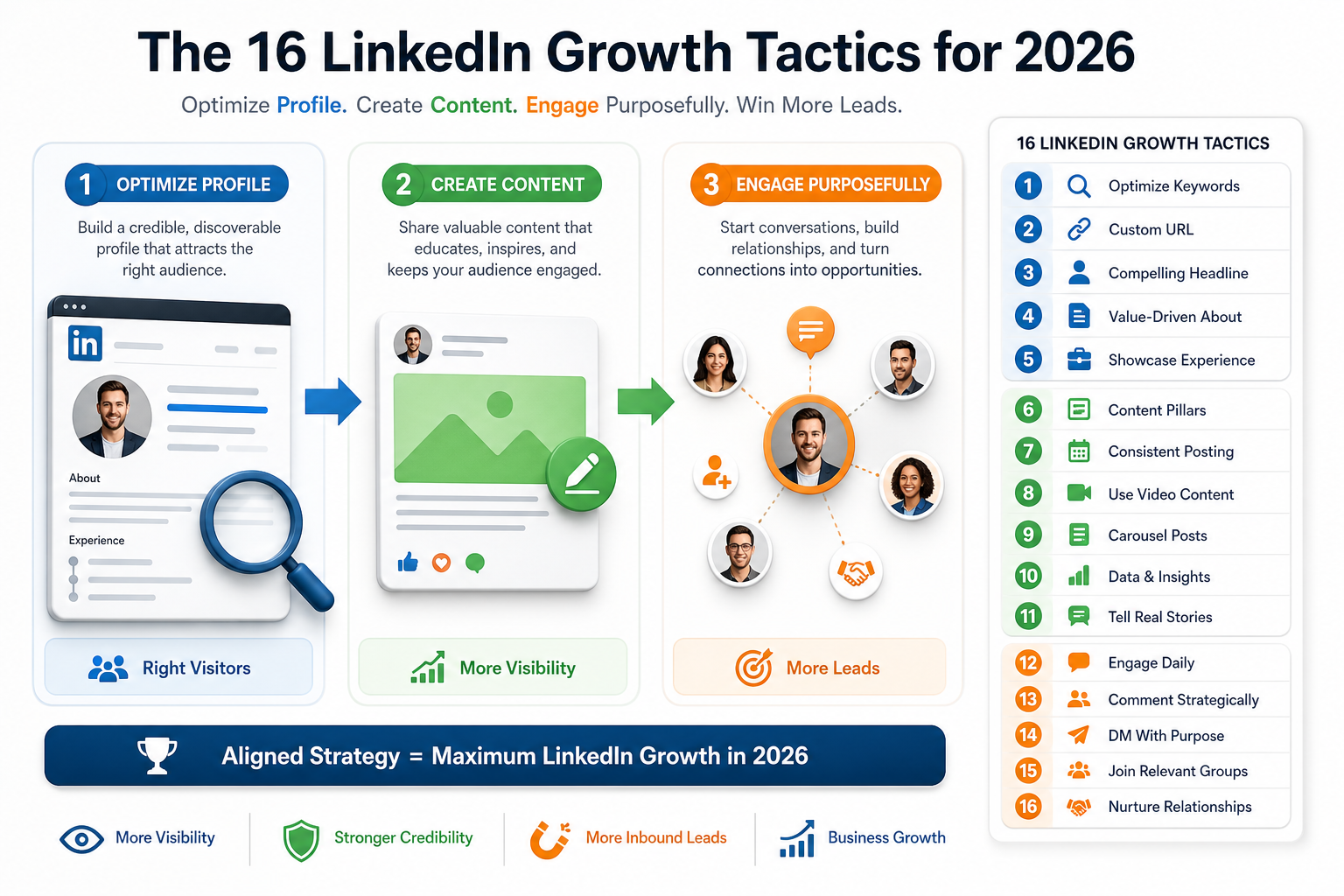
The 16 LinkedIn Growth Tactics for 2026
LinkedIn growth in 2026 rests on a holistic approach that optimizes three core engines: your profile, your content, and your engagement. The sixteen tactics below synthesize proven methods from the broader growth hacks and related strategy insights. When these elements align, your profile attracts the right visitors, your content keeps them engaged, and purposeful engagement turns conversations into qualified leads. Use them as a structured playbook to boost visibility, credibility, and inbound opportunities on LinkedIn this year.
-
1) Optimize with Relevant Keywords
Treat your profile like a micro website and weave in terms your target audience searches for. Research common terms in your niche by studying top profiles and industry pages. Place keywords naturally in your headline, About section, and experience descriptions to improve visibility on LinkedIn and in external search results.
- Target audience specific terms rather than generic titles.
- Incorporate keywords in a human, readable way.
- Balance optimization with clear value propositions to avoid keyword stuffing.
Think of your profile as an SEO asset rather than a static resume. Identify the exact terms your audience uses when searching for solutions and weave them into relevant sections. This aligns language with intent and helps attract the right visitors. It also boosts credibility when your messaging mirrors reader expectations.
-
2) Craft a Custom LinkedIn URL
A clean, custom URL increases credibility and simplifies sharing. Replace the default string of numbers with a concise, professional handle that mirrors your name or brand, and promote it in signatures and marketing materials.
- Example: linkedin.com/in/YourName
- Shareable URLs improve memory recall and search discoverability.
-
3) Write a Strong, Problem Solving Headline
Your headline should communicate the specific value you provide, not just your title. Translate benefits into a compact message that answers who you help, what you deliver, and how you do it.
- Template idea: Helping B2B audiences achieve specific result via method.
- Examples emphasize outcomes like revenue, time saved, or efficiency gains.
-
4) Use a Professional Profile Photo
Choose a clear, high quality headshot with a warm expression. A trustworthy image reduces friction and invites connection requests. Pair the photo with a headline that speaks directly to your audience’s needs.
-
5) Leverage a Compelling LinkedIn Banner
Design a banner that communicates your core offering, the audience you serve, and a primary CTA. Use imagery and a concise message to capture attention within seconds and guide visitors to take the next step.
-
6) Spotlight Key Offers in the Featured Section
Highlight your best value propositions in Featured. Include a low commitment option, a mid tier offer, and a high ticket pathway to cover different reader readiness levels.
- Link to a lead magnet, a calendar booking, or a high impact case study.
- Keep this area updated with fresh success stories and assets.
-
7) Update Contact Information for Ease of Reach
Ensure your preferred contact method is visible. Provide multiple avenues such as email, calendar links, and a messenger option to minimize friction for leads to reach you.
-
8) Optimize the About Section with a Mini Sales Page
Use the About section to illustrate your audience specific struggle, your unique solution, and the tangible results you deliver. Follow a structure like Attention, Interest, Desire, Action to guide readers toward a calendar link or next step.
- Lead with a strong hook that resonates with your ICP.
- Incorporate social proof and clear CTAs.
-
9) Reorder Profile Sections for Conversion
Place the most actionable sections near the top of your profile so visitors quickly grasp your value. Consider featuring case studies or offers before the typical summary content.
-
10) Make Your Profile Public
Public visibility expands reach beyond your first degree connections and improves search indexing. Review privacy settings to ensure your full profile is accessible to prospective clients and partners.
-
11) Post Consistently with Purpose
Consistency signals reliability to the LinkedIn algorithm and your audience. Start with a moderate cadence and scale as you confirm steady engagement. Use premium insights when available to fine tune timing and topics.
- Early in the year, aim for 3 to 5 quality posts per week.
- Monitor engagement to identify the best days and times for your audience.
-
12) Use Visuals to Increase Readability
Text heavy posts lose attention quickly. Integrate visuals like images, GIFs, and short videos to create scroll-stopping content that communicates faster.
-
13) Create Carousels to Tell a Story
Carousels combine multiple slides to present a narrative, process, or step by step guide. They tend to achieve higher reach and engagement compared to regular posts.
-
14) Implement a Focused Hashtag Strategy
Limit hashtags to a handful aligned with your niche. Use a mix of broad and niche tags and update your routine to avoid overuse and stagnation.
-
15) Engage with Comments to Expand Reach
Deliberate engagement on others’ posts can boost your visibility. Plan short, meaningful comments in targeted sessions and categories to grow impressions and inbound opportunities.
-
16) Use Lead Magnets to Capture High-Quality Leads
Offer value magnets such as checklists, templates, or quick assessments to attract a large pool of leads. An effective lead magnet can convert viewers into subscribers or booked conversations.
Beyond these core tactics, remember that the strongest LinkedIn growth efforts combine a precise audience focus with a repeatable process. Use data to refine your content mix, test different hooks, and iteratively improve the funnel from profile discovery to conversation to conversion. In 2026, a disciplined, profile-centric, content-driven, and engagement-oriented approach remains the most reliable path to sustainable LinkedIn growth.
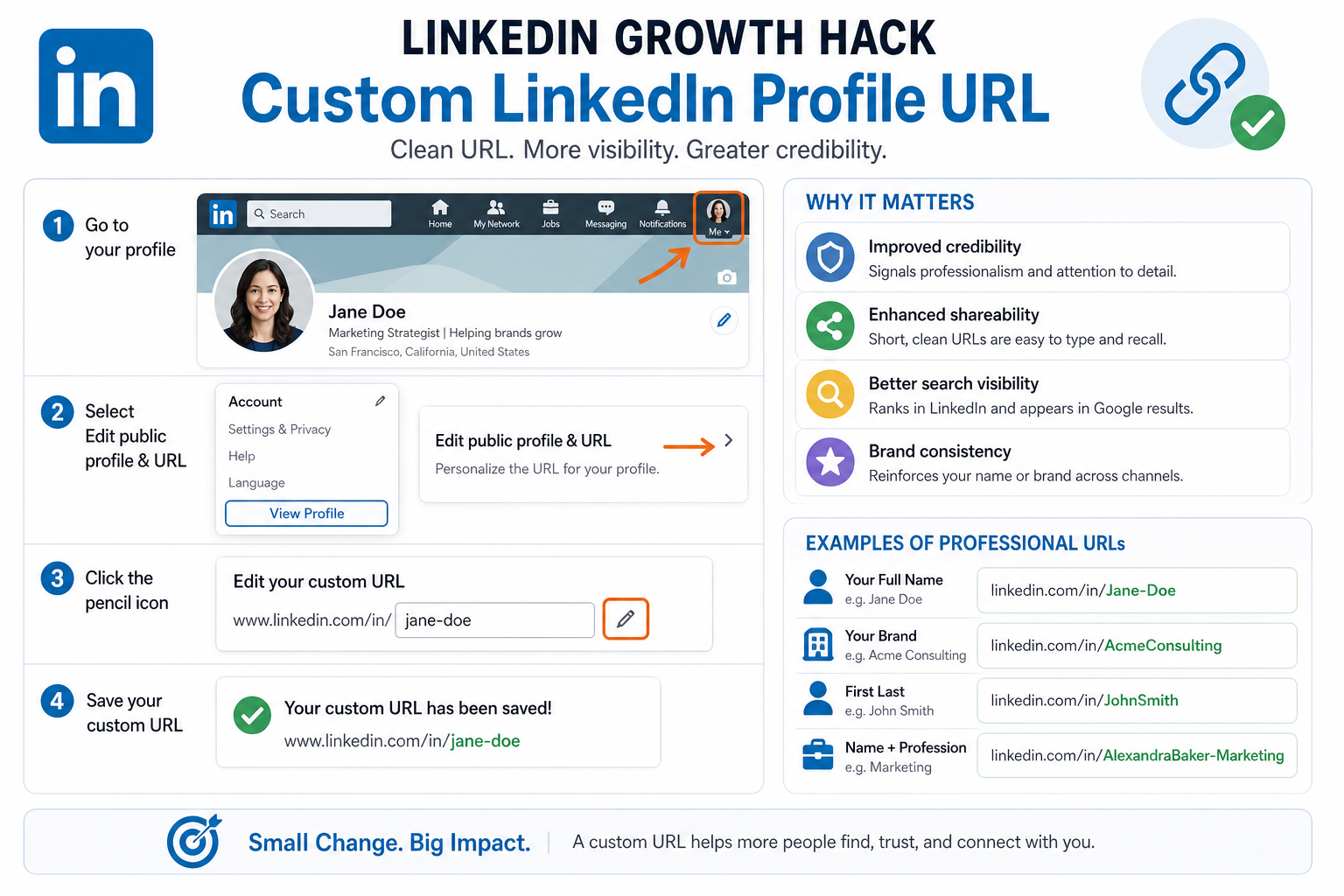
LinkedIn Growth Hack – Custom LinkedIn Profile URL
LinkedIn Growth Hack – Custom LinkedIn Profile URL
A clean, custom profile URL is a small detail with a big impact. By replacing the default string of random numbers and characters with a concise, professional handle, you create a URL that is easy to remember, easy to share, and visually aligned with your personal or brand identity. This small upgrade boosts your profile’s credibility and makes it more likely that people will click through when they encounter your link in emails, signatures, or outreach messages.
Key benefits include:
- Stronger credibility: A polished URL signals professionalism and attention to detail.
- Easier sharing: Short, clean URLs are easier to type and recall, increasing the likelihood of direct visits.
- Better search visibility: Custom URLs can rank in LinkedIn search and appear in Google results, helping searchers find you more easily.
- Brand consistency: Using your name or brand in the URL reinforces recognition across channels.
Examples of professional profile URLs you can aim for include:
- linkedin.com/in/YourFullName e.g. linkedin.com/in/Jane-Doe
- linkedin.com/in/YourBrand e.g. linkedin.com/in/AcmeConsulting
- linkedin.com/in/FirstLast e.g. linkedin.com/in/JohnSmith
- linkedin.com/in/YourNameProfession e.g. linkedin.com/in/AlexandraBaker-Marketing
How to set it up:
- Go to your LinkedIn profile and select the Edit public profile & URL option (location may vary by version).
- Click the pencil icon next to your current URL to edit your public profile URL.
- Enter your desired URL using your name or brand. Aim for readability and consistency with other channels.
- Save the changes and test the link to confirm it redirects correctly.
Tips for choosing a URL:
- Prefer name-based formats when possible to maximize recall.
- Avoid numbers or excessive punctuation unless necessary for uniqueness.
- Keep it short and free of special characters that hinder typing.
Once set, include your custom URL in your email signature, business cards, website, and any outreach material. This single adjustment can contribute to higher profile views, improved trust in your messages, and better integration with your broader LinkedIn growth tactics.
LinkedIn Growth Hack – Professional Picture
Professional Picture
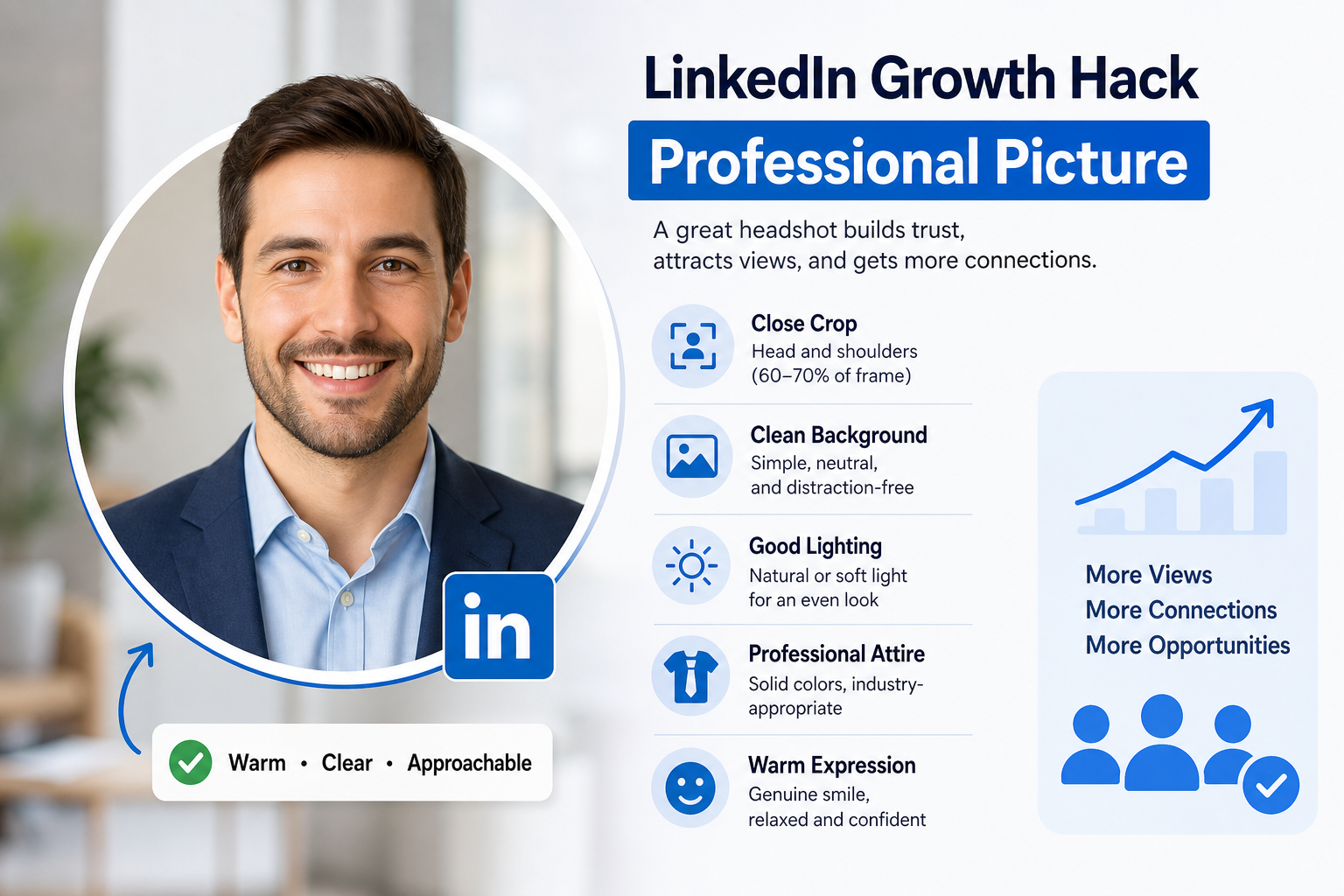
Your profile photo is the first impression a visitor forms, and on LinkedIn that initial glance often determines whether someone stops to read your message or scrolls on by. A clear, high quality headshot with a warm and approachable vibe signals credibility, professionalism, and openness to connect. This small visual cue can dramatically boost your profile views and connection requests because people are naturally drawn to faces that feel trustworthy and friendly.
Key considerations for a headshot that converts:
- Clarity and resolution: Use a high resolution image where your features are sharp and easily recognizable even on mobile screens.
- Framing: Aim for a close crop that shows your head and shoulders. Your face should occupy roughly 60 to 70 percent of the frame.
- Background: Choose a clean, neutral background that minimizes distractions. Subtle textures or a simple office setting can work well depending on your industry.
- Lighting: Opt for natural light or soft, diffused lighting that evenly brightens your face. Avoid harsh shadows or overhead lighting that can create unflattering contours.
- Attire: Dress in professional, industry-appropriate clothing. Solid colors tend to photograph better than busy patterns and help focus attention on your face.
- Expression: A warm, genuine smile and relaxed posture convey approachability. Avoid stiff or overly serious expressions unless your brand requires it.
- Framing and bandwidth: Ensure the image remains clear when scaled down for LinkedIn thumbnails. Test how it appears in the profile preview and on mobile.
Practical tips to elevate your headshot quickly:
- Hire a professional headshot session if possible, or use a tripod and a friend to capture a well composed shot.
- Use consistent branding: Align your headshot style with your other visuals, so your LinkedIn presence feels cohesive across platforms.
- Update regularly: Refresh your photo every couple of years or after a significant professional change to keep your profile current.
When your photo projects competence and approachability, visitors are more inclined to read your About section, engage with your content, and initiate conversations. The headshot is not just a picture; it is a trust signal that underpins every interaction on LinkedIn.
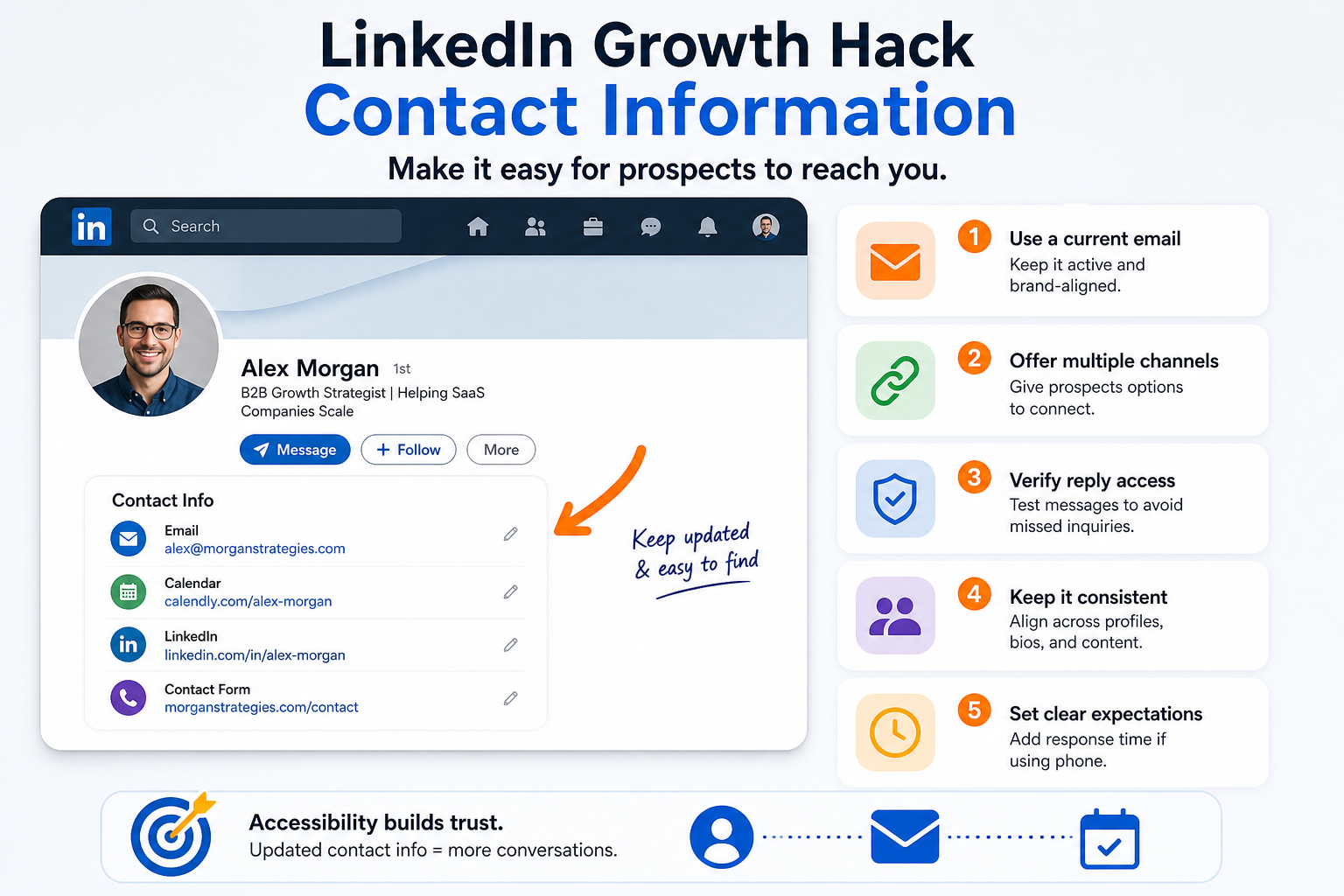
LinkedIn Growth Hack – Contact Information
LinkedIn Growth Hack – Contact Information
Accessibility is a foundation in LinkedIn growth. Prospect outreach hinges on how easily someone can reach you after they finish reading your profile or engaging with your content. The most overlooked friction point is outdated or hard-to-find contact details. A small update can unlock a wave of qualified inquiries and booked conversations.
Key actions to optimize contact information for reliable outreach:
- Update your primary contact method with a current email address you actively monitor. If you have a business domain, use an email that matches your brand for consistency and credibility.
- Include multiple channels such as a calendar link, direct message option, and a professional contact form when possible. Providing several pathways reduces friction and increases the chance of a timely response.
- Verify accessibility of replies by testing messages from a fresh inbox or a colleague account. Ensure replies land in the intended mailbox and aren’t filtered as spam.
- Keep your messaging channel consistent across profiles and signatures. If you prefer email, use email as the default outreach channel in your About section, Featured items, and any posts that invite inquiries.
- Avoid outdated or personal numbers unless you actively monitor them. If you use a phone number, add a note about typical response times to set expectations.
Practical steps to implement now:
- Audit your contact details on your LinkedIn profile and in the About section to identify any outdated information.
- Replace with current addresses for email or contact forms, prioritizing a professional channel you can respond to promptly.
- Test reachability by sending a test message from a different account and confirming receipt within 24 hours.
- Document your preferred outreach path in a simple guide for team members to ensure consistent handling of inbound inquiries.
Why this matters: clear and current contact details reduce drop-offs, improve response rates, and help you capture more qualified conversations. When prospects can reach you without friction, your LinkedIn presence becomes a reliable gateway to meaningful business outcomes rather than a static digital resume.
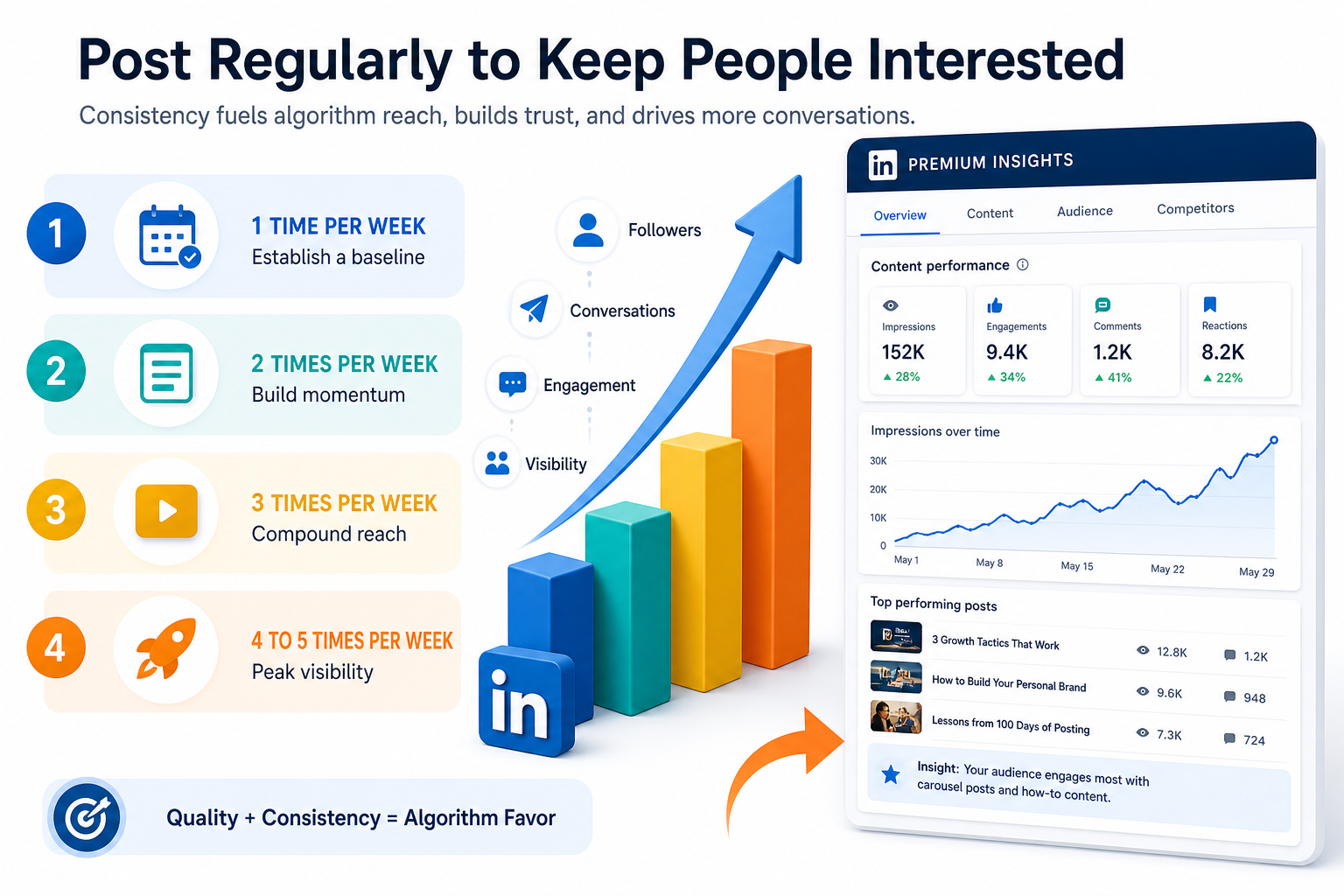
LinkedIn Premium Hacks – Post Regularly to Keep People Interested
LinkedIn Premium Hacks – Post Regularly to Keep People Interested
Consistency signals credibility to the LinkedIn algorithm. When you show up regularly, you create a predictable rhythm your audience learns to expect. The platform rewards sustained presence with higher distribution, more impressions, and eventually more inbound conversations. The goal is not to flood feeds with low-value content but to establish a reliable cadence that balances quality and frequency so your posts become a routine stop for your target audience.
Start with a realistic cadence and scale as you gain confidence and consistent engagement. The following stepwise framework moves you from occasional to steady posting without burning out.
- 1 time per week — Establish a baseline. A single, strong post sets the expectation that you show up and provides a reference point for engagement patterns. Use this phase to test topics, formats, and timing.
- 2 times per week — Build momentum. Increase visibility by targeting two complementary formats, such as a short insight post and a value-driven carousel. Track saves and comments as primary signals of relevance.
- 3 times per week — Compound reach. Add a mix of media types (text, image, video) and weave in a recurring theme or series to encourage returning viewers. This cadence tends to yield more consistent engagement without overwhelming your audience.
- 4 to 5 times per week — Peak visibility with intent. This level works once you have a clear niche and reliable engagement. Prioritize high-quality, actionable content and use LinkedIn features like polls or carousels to sustain momentum.
- More than 5 times per week — Consider batch creation and repurposing. If you reach this level, ensure every post maintains value and avoids content fatigue. Use analytics to stop posting when signals drop rather than simply posting more.
How to apply this cadence effectively while protecting quality:
- Quality first: outline a clear value proposition in every post and trim fluff to keep attention focused.
- Content variety: combine tips, case studies, behind the scenes, and actionable frameworks to appeal to different learning styles.
- Engagement loops: end posts with a question or prompt that invites comments and discussion.
- Consistency over perfection: aim for reliable outputs more than perfect statements. Your audience values reliability.
Leveraging LinkedIn Premium insights to optimize posting strategy:
- Audience insights: Premium analytics provide deeper visibility into who is engaging with your content, allowing you to refine topics and tailor messaging for high-value segments.
- Post-performance trends: Look for patterns in which formats and topics drive saves, shares, and comments. Use this data to double down on successful formats.
- Engagement rate benchmarks: Compare your engagement rate against your historical averages to detect when you have an underperforming cycle and adjust quickly.
- Content suggestions: Premium features surface relevant topics and questions your audience is discussing, helping you generate ideas aligned with intent.
Practical implementation steps you can apply this week:
- Set a calendar block for 1 to 5 posts per week, then commit to it for 4 weeks to gather enough data.
- Choose a balanced mix of formats (text posts, carousels, short videos) to maximize reach and keep readers engaged.
- Draft a 4-week content plan with themes, hooks, and CTAs. Reserve a day for batching content creation.
- Review Premium metrics weekly to identify top performers and adjust topics and formats accordingly.
Notes on content quality and audience resonance: A steady posting rhythm helps the algorithm understand your value proposition and increases the likelihood that your content appears in the feeds of your target audience. By combining disciplined cadence with data-driven adjustments from Premium insights, you create a sustainable growth loop that translates views into meaningful conversations, opportunities, and inbound inquiries. The core idea is simple: show up consistently, deliver real value, and let the data guide your refinements over time.
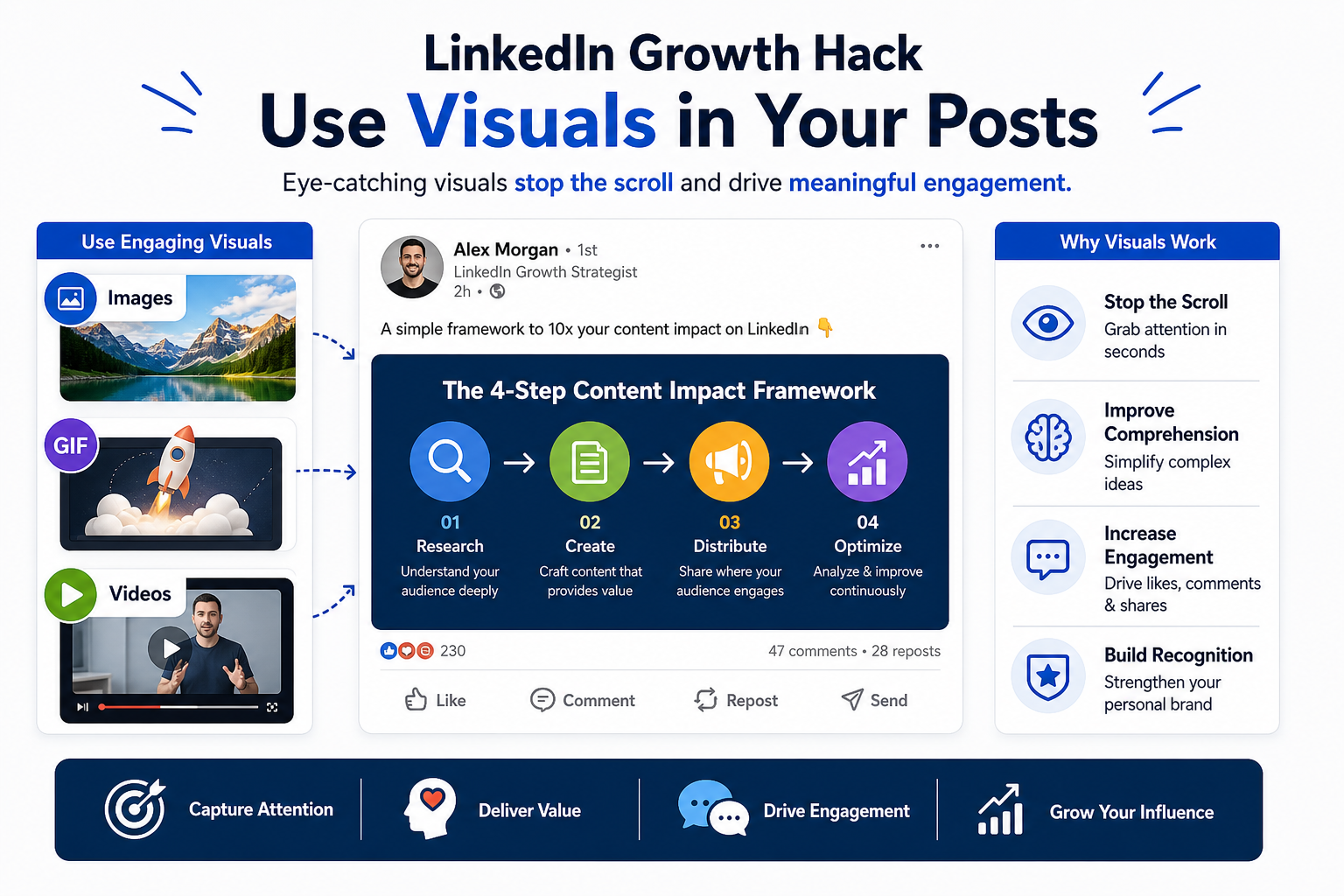
LinkedIn Growth Hack – Use Visuals in Your Posts
LinkedIn Growth Hack – Use Visuals in Your Posts
In the fast scrolling environment of LinkedIn, visuals are the first hook that stops the scroll and invites a deeper read. Eye-catching images, GIFs, and short videos boost engagement, improve retention, and increase recall. When used purposefully, visuals become a force multiplier for your LinkedIn Growth Tactics by turning dense ideas into easily digestible and shareable experiences.
Key reasons visuals boost performance:
- Visuals capture attention within the first few seconds as users skim their feeds.
- Images and video improve comprehension of complex topics and frameworks.
- Multimedia formats encourage longer dwell time and more meaningful interactions.
- Consistent visual branding strengthens recognition across posts and profiles.
Practical guidelines to maximize visual impact:
| Visual Type | Best Use Cases | Tips |
|---|---|---|
| Images | Cover concepts, before-after results, processes |
|
| GIFs | Micro-tunnels into a concept, quick demos |
|
| Short Videos | Tips, frameworks, case study summaries |
|
Optimization and accessibility do not end with the post itself. Plan visuals with these production practices in mind:
- Consistent branding: Align visuals with your established color schemes, fonts, and logos to reinforce recognition across your LinkedIn Growth Tactics plan.
- Captions matter: Always include a concise caption or overlay text that clarifies the takeaway or action you want readers to take.
- File size and format: Use optimized formats such as PNG or JPEG for images and MP4 for videos to balance quality with fast loading times.
- Mobile readiness: Design for small screens; ensure text remains legible and key elements stay within the safe visual zone.
- Alt text and accessibility: Provide descriptive alt text for images and captions for videos to improve accessibility and search discoverability.
Step by step, here is a quick workflow to implement visuals into your LinkedIn posts this week:
- Audit your current posts to identify which visual formats performed best and where you can introduce more imagery.
- Define a visual brief for your next 5 posts, selecting one image, one GIF, and one short video concept to cover different audience preferences.
- Create assets in batches using a simple template system so visuals are ready to publish on the same day you draft the copy.
- Test and iterate track engagement signals such as saves, comments, and shares to determine which formats deliver the strongest lift and refine your approach accordingly.
By weaving eye-catching visuals into your LinkedIn Growth Tactics, you create a more compelling narrative that resonates with professionals, improves comprehension of your ideas, and accelerates the journey from discovery to conversation and conversion.
LinkedIn Growth Hack – Create Carousels
LinkedIn Growth Hack – Create Carousels
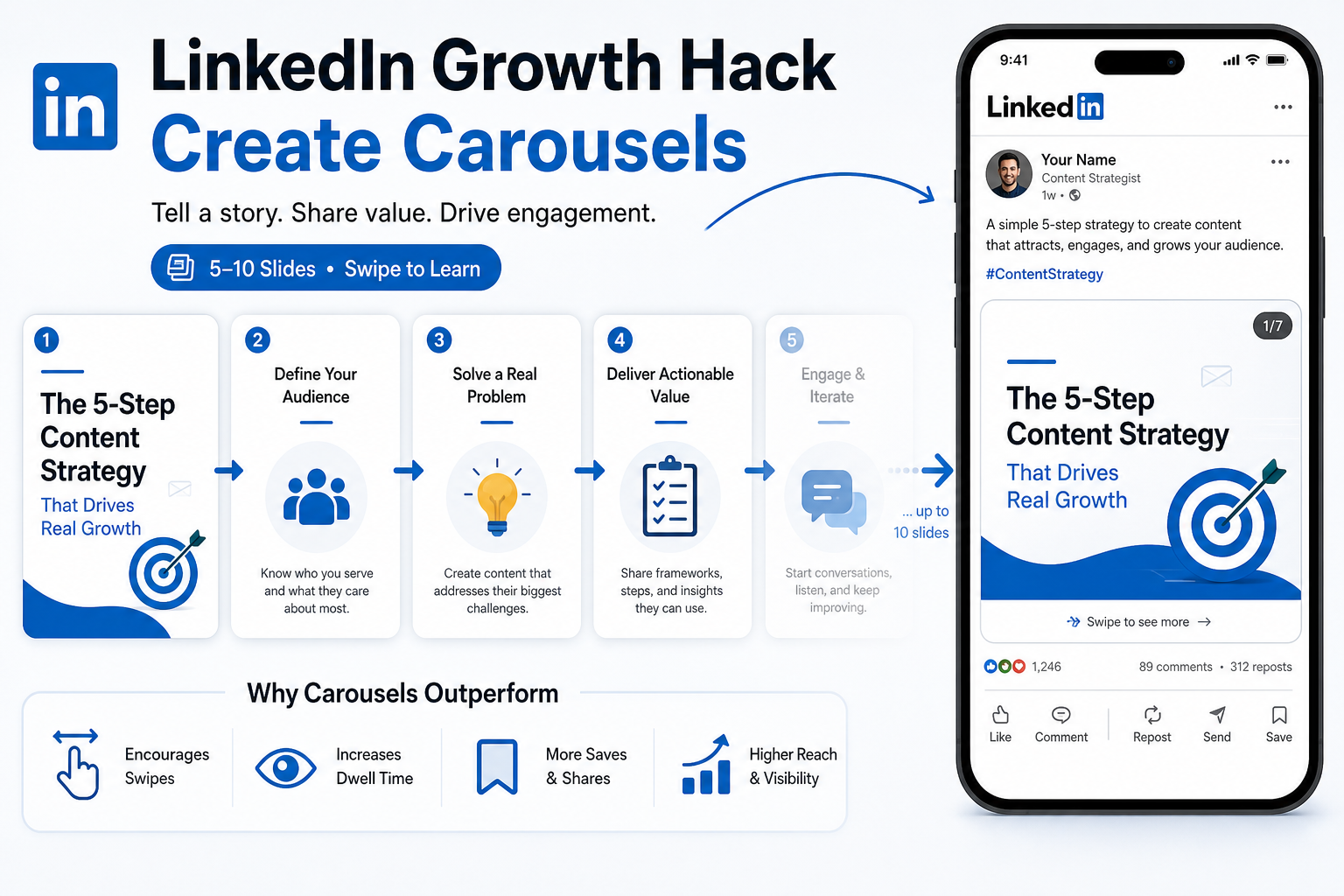
Carousel posts are a proven high engagement format on LinkedIn because they invite readers to swipe through a sequence that unfolds a story, framework, or step by step process. By combining concise copy with a clean visual rhythm, carousels keep attention longer, increase saves and shares, and expand reach beyond your immediate connections. When used strategically, a 5 to 10 slide carousel can carry a compelling narrative from hook to takeaway, turning passive scrollers into active learners and potential collaborators.
Why carousels outperform traditional posts:
- Swipe experience encourages deeper engagement as users invest time to progress through slides.
- Slide based storytelling makes complex concepts easier to digest through progressive disclosure.
- Mixing text with visuals supports different learning preferences and improves recall.
- Carousels tend to achieve higher reach due to longer dwell time and save motivations.
Key design and content principles to maximize impact:
| Principle | What it means | Practical tips |
|---|---|---|
| Consistency | Maintain a recognizable visual system across slides |
|
| Clarity | Each slide communicates a single idea or step |
|
| Visual Rhythm | Swing between text blocks and visuals to keep eyes moving |
|
| Story Arc | Lead with a hook, deliver value, close with a CTA |
|
Recommended structure for a 5 to 10 slide carousel:
- Slide 1 — Hook that resonates with your ICP and promises a concrete outcome.
- Slides 2–3 — Short story or context that leads to the core framework or steps.
- Slides 4–6 — The actionable content: 3 to 5 steps, formulas, or checklists.
- Slides 7–9 — Examples, social proof, or quick case visuals that validate the method.
- Slide 10 — Strong CTA: invite comments, ask to save for later, or book a conversation.
Practical tips for creating high performing carousels:
- Draft a tight outline: map each slide to a single idea before designing.
- Use legible type: large headlines, 18 to 28 point range depending on slide size.
- Include captions: add a short caption below the carousel to reinforce the takeaway and provide context for readers who scroll past the slides.
- Design for mobile: ensure text remains readable when viewed in a narrow frame and that key elements stay within the safe zone.
- Test different hooks: experiment with problem statements, bold claims, or surprising data to identify what drives initial swipes.
Workflow to produce compelling carousel posts this week:
- Idea to outline in 15 minutes: state the problem, the solution, and the 3 to 5 steps you will share.
- Visual assets: prepare a consistent slide template and gather supporting visuals or simple icons for each step.
- Slide by slide copy: write concise, value focused text for each slide, keeping each line actionable.
- Design batch: assemble all slides in one design session to maintain brand consistency.
- Publish and monitor: share at a time when your audience is most active and track saves, comments, and shares to guide future topics.
Carousels, when executed with discipline and clarity, become a repeatable engine for reach and engagement on LinkedIn. They turn ideas into navigable experiences and help you demonstrate expertise in a structured, scroll friendly format that encourages readers to take the next step in their buyer journey or collaborative conversation.