Most advice on how to automate LinkedIn outreach is wrong because it starts with volume. More requests. More DMs. More sequences. More activity.
That approach creates the exact problem teams think automation will solve. It fills dashboards with motion while starving pipeline of signal. A Gartner sales research summary reports that 68% of sales teams struggle to connect social engagement activities to pipeline growth, and the same verified dataset notes a 2025 LinkedIn survey in which 72% of marketers use automation, but only 29% can accurately attribute an inbound lead to a specific outreach campaign. The gap isn't effort. It's outcome tracking.
If you want to automate LinkedIn outreach without turning your account into a spam machine, build the system backwards from meetings, qualified conversations, and attributable revenue. Activity still matters, but only as an input. The output is pipeline.
Table of Contents
- Moving Beyond Noise to Generate Real Pipeline
- Designing Your Comments-First Outreach Strategy
- Crafting Messages and Comments that Get Replies
- Building a Safe and Scalable Automation Workflow
- Measuring What Matters and Proving ROI
- Put Your LinkedIn Growth on Autopilot
Moving Beyond Noise to Generate Real Pipeline
High activity on LinkedIn can hide a weak outbound system.
I've seen teams celebrate send volume while the calendar stays empty. The workflow looks efficient. The dashboard looks healthy. Revenue says otherwise. If automation is not producing qualified conversations and attributable pipeline, it is just faster noise.
Why most automation underperforms
Many LinkedIn automation products are built around throughput. Their defaults push users toward more connection requests, more follow-ups, and wider audience filters. That design choice matters because teams start managing the tool instead of managing outcomes.
The failure usually starts with measurement. Send count is visible. Acceptance rate is easy to pull. Pipeline attribution takes work, so it gets skipped. Then the system drifts toward whatever makes the activity graph go up, even if reply quality drops and meetings never follow.
Practical rule: If you cannot trace outreach to booked meetings or qualified sales conversations, you do not have a reliable growth channel.
A stronger setup treats LinkedIn as a demand generation channel with clear commercial intent. That means tighter ICP definitions, deliberate warm-up through relevant engagement, and tracking each touchpoint against downstream sales events.
Three operating shifts change the result:
- Set funnel targets instead of send targets. Review accepted connections, positive replies, meetings booked, and opportunities created.
- Weight actions by business value. A strong comment that drives a profile visit and starts a conversation is worth more than a batch of ignored DMs.
- Compare performance by segment. Founders, revenue leaders, and operators respond to different hooks, objections, and proof points.
What an outcome-first system measures
An outcome-first system answers practical questions. Which post themes bring the right buyers to your profile? Which comment angles create inbound interest? Which connection request copy leads to meetings instead of passive accepts?
This creates the blind spot in many LinkedIn programs. The team is active, but nobody can show which interactions influenced pipeline. That makes it hard to improve targeting, hard to justify spend, and easy to keep scaling a weak motion.
If your targeting and sequencing still need work, this LinkedIn lead generation strategy guide gives a solid starting framework. The goal is simple. Automate repeatable steps that can be tied to conversations, opportunities, and revenue.
Designing Your Comments-First Outreach Strategy
Cold outreach asks for attention before trust exists. Comments-first outreach earns attention in public before you ever enter someone's inbox.
That difference matters. The strongest LinkedIn systems don't begin with a connection request template. They begin with visibility inside the conversations your buyers already care about.
Why comments outperform cold interruption
A thoughtful comment does three jobs at once. It puts your name in front of the right audience. It shows expertise without pitching. It warms the eventual direct outreach because the prospect has already seen you contribute.
The quality of the comment is the whole game. Verified guidance from Simular's write-up on LinkedIn auto-commenting notes that AI agents that read complete posts and generate unique, context-aware comments avoid account restrictions, whereas tools generating generic, title-based responses often trigger flags. The same source also notes that pacing interactions to mimic natural human behavior is key.
That's why surface-level automation fails. A bot that reacts to keywords in a headline produces obvious junk. A system that reads the full post can add an informed question, a contrarian insight, or a useful example.
A good comment usually does one of these:
- Extends the idea. Add a second-order observation the author didn't state directly.
- Tests the argument. Ask a precise question that moves the conversation forward.
- Connects it to execution. Translate a broad point into an operator-level takeaway.
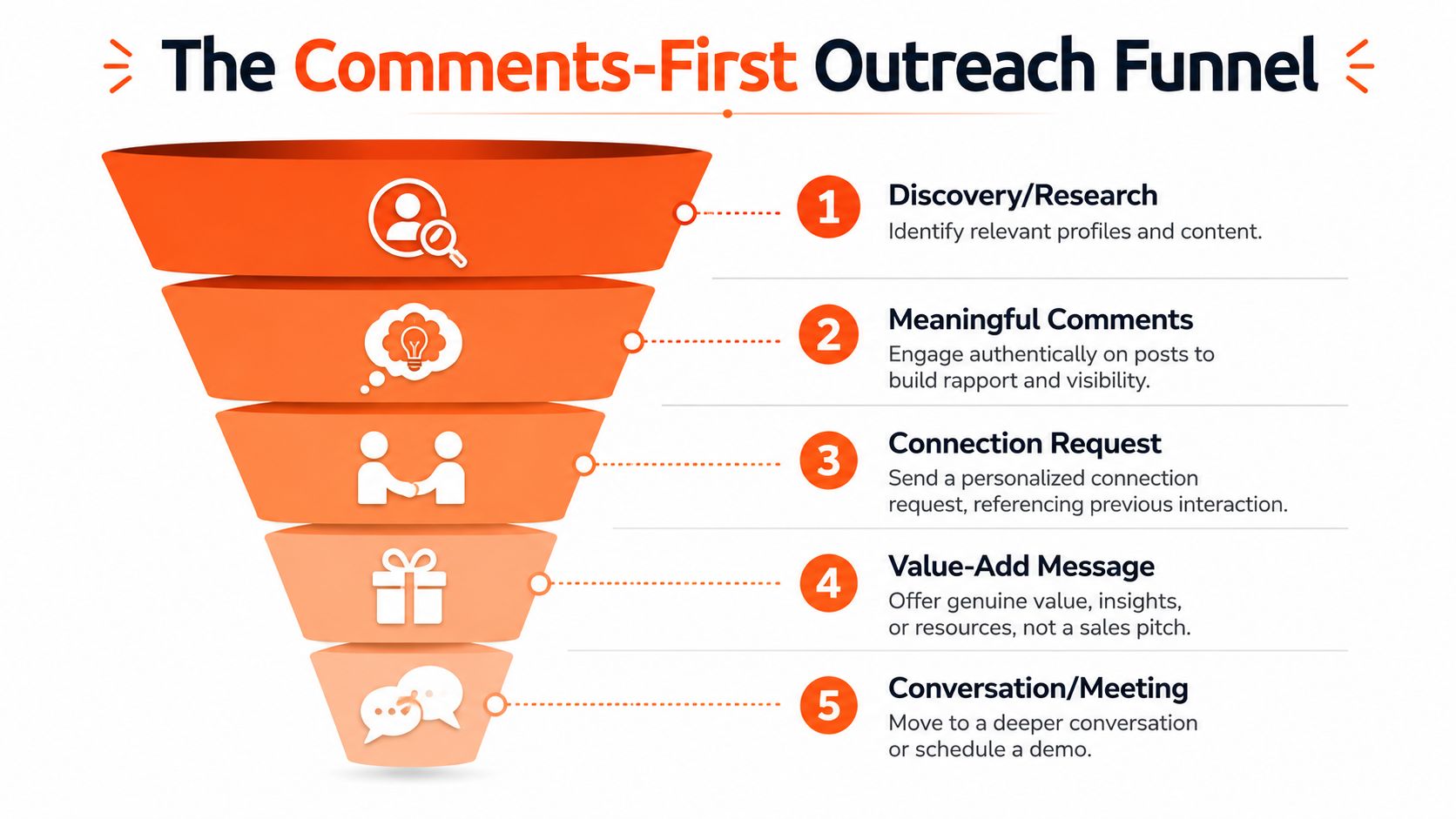
How to structure the funnel
The comments-first model works best as a sequence, not a single tactic.
- Find relevant people and active threads. Prioritize your ICP and adjacent voices they engage with.
- Comment consistently with substance. Aim for recognizability, not random appearance.
- Send a connection request after visible interaction. Reference the post or thread naturally.
- Follow with a value-add message. Share an observation, resource, or relevant question.
- Move to conversation only when interest is earned.
A detailed walkthrough of that style lives in this guide on how to comment on LinkedIn to get noticed.
This is the point where many teams overcomplicate the stack. They don't need more templates. They need a better engagement order.
For a visual example of this motion in action, watch this short breakdown:
Comments-first outreach flips the funnel. Instead of pushing into inboxes cold, you create repeated, low-friction exposure until prospects come into the conversation warm.
Posting strengthens the system, but it shouldn't replace commenting. Your own posts build authority on your profile. Comments borrow reach from threads that already have attention. Used together, they create familiarity before the first direct ask.
Crafting Messages and Comments that Get Replies
Once the audience is warm, the writing has to stay tight. Most automated outreach breaks down here because it tries to sound personalized while still reading like a template.
The shortest path to better performance is usually subtraction. Remove the fake compliments. Remove the broad claims. Remove the instant pitch.
What weak outreach gets wrong
The most common failure mode is easy to spot. The message is long, generic, and self-focused. That combination kills response quality.
Verified data from Artisan's LinkedIn outreach strategy analysis shows that InMails under 400 characters achieve a 22% higher reply rate than longer messages, and personalizing a message can boost responses by 30%. That doesn't mean stuffing in fake personalization tokens. It means referencing something real and staying concise.
Bad message:
“Hi Sarah, I help B2B companies transform their sales outcomes with an advanced platform. I'd love 15 minutes to show you how we can help.”
Better message:
“Saw your post on AE ramp. The point about coaching consistency was sharp. We're seeing the same issue in scaling teams. Happy to swap notes if useful.”
The same rule applies to comments. Don't summarize the post back to the author. Add something they didn't already say.
Outreach Message & Comment Templates
This LinkedIn DM outreach strategy guide is a useful reference for adapting tone by audience. Use the frameworks below as structure, not copy.
Outreach Message & Comment Templates
| Touchpoint | Template Framework | Example |
|---|---|---|
| Connection request | Reference one specific interaction or recent activity, then give a light reason to connect | “Your point on onboarding lag in yesterday's thread was sharp. I work with teams facing the same issue and would be glad to connect.” |
| First DM after acceptance | Thank briefly, continue the topic, offer a useful angle, end with a soft question | “Thanks for connecting. Your comment on attribution stayed with me. I've found most teams can see activity but not what actually led to a meeting. Are you seeing that too?” |
| Value-add follow-up | Share a relevant observation, framework, or resource without pitching | “One pattern that helps is tagging each outreach action to a downstream outcome category. It makes weak segments obvious fast. Happy to share how I structure that if helpful.” |
| Comment on ICP post | Add a practical observation, counterpoint, or execution detail from experience | “Strong point. The gap usually appears when teams measure send volume instead of response quality. The campaign looks healthy until nobody can tie it to meetings.” |
| Comment on influencer thread with ICP in audience | Contribute a clear perspective that shows expertise without baiting attention | “This is where most operators get stuck. Personalization isn't the bottleneck anymore. Attribution is. If you can't map engagement to pipeline, scale just magnifies waste.” |
A few writing rules keep outreach from sounding automated:
- Use one real hook. Mention a post, job change, company update, or thread participation.
- Keep the ask light. Early messages should open dialogue, not force a demo.
- Write the way people talk. Short sentences. Clear nouns. No jargon pileup.
- Match the context. A founder may respond to strategic framing. An operator may prefer execution detail.
“The first message isn't supposed to close. It's supposed to earn the second message.”
If you're automating comments at scale, train your system on your actual language. That means using your vocabulary, your sentence rhythm, and your point of view. Otherwise the output may be grammatically correct and still feel fake.
Building a Safe and Scalable Automation Workflow
Safe LinkedIn automation is an operations problem, not a volume setting.
Teams get into trouble when they treat limits as the whole safety plan. Low send counts do not help much if the account fires actions at perfect intervals, runs the same sequence every day, or publishes weak comments at scale. LinkedIn risk is pattern-based. Pipeline risk is quality-based. You need to control both.
What safe automation actually looks like
According to HeyReach-style guidance on safe LinkedIn automation, a 2025 study found that 84% of users flag outreach as bot-like because of predictable timing rather than content, and randomized delays plus non-linear activity patterns can reduce bot detection rates by 63% compared with standard automation.
That matches what holds up in practice. Strong systems do not operate on a metronome. They run in uneven sessions, leave gaps between actions, and stay close to the way a real person uses LinkedIn during the workday.
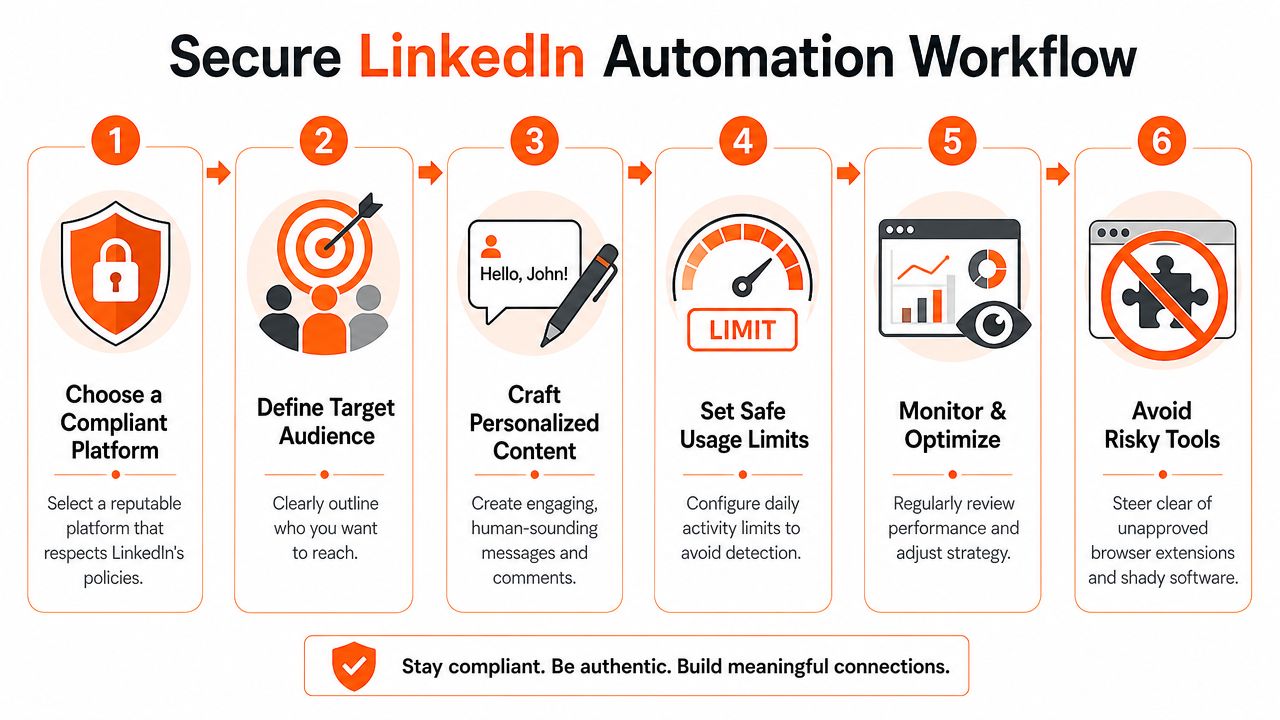
The same source recommends a 14-day manual warm-up period, cloud-based infrastructure instead of browser extensions, 45 to 120 seconds of randomized delay between actions, and activity kept below LinkedIn's invite cap, with 20 to 30 connection requests and 30 to 50 messages per day as safer operating ranges.
A practical operating model
The workflows that last usually follow five rules:
- Warm accounts manually first. New automation on a cold account creates avoidable risk.
- Run through cloud infrastructure. Browser extensions create cleaner fingerprints for LinkedIn to spot.
- Rate-limit each action type on its own. Connection requests, profile views, comments, and messages should rise gradually, not all at once.
- Match normal working patterns. If the account owner rarely works weekends, scheduled weekend activity creates unnecessary inconsistency.
- Review output quality every week. Sending more bad comments does not create more pipeline.
Sequence matters too.
A believable workflow might include a profile view on day one, a like or comment later, then a connection request after the prospect has seen your name once or twice. That sequence reduces friction, and it improves commercial performance because the prospect has context before the message arrives.
For teams, safety also depends on clear controls:
| Workflow layer | What to enforce |
|---|---|
| Account readiness | Manual warm-up and complete profile hygiene |
| Infrastructure | Cloud-based execution and rate-limited actions |
| Timing | Randomized spacing, variable session length, realistic working-hour windows |
| Content quality | Unique comments and messages grounded in actual context |
| Oversight | Approval workflows for posts and sensitive outreach |
The goal is for automation to behave like a careful assistant rather than a tireless bot.
If a team is running outreach across multiple reps, add approvals before scale. Managers should review drafts, check whether the personalization is relevant, and stop off-brand messaging before it reaches live prospects. That protects the account, but it also protects revenue. Automation that burns trust never produces efficient pipeline, even if the activity dashboard looks full.
Measuring What Matters and Proving ROI
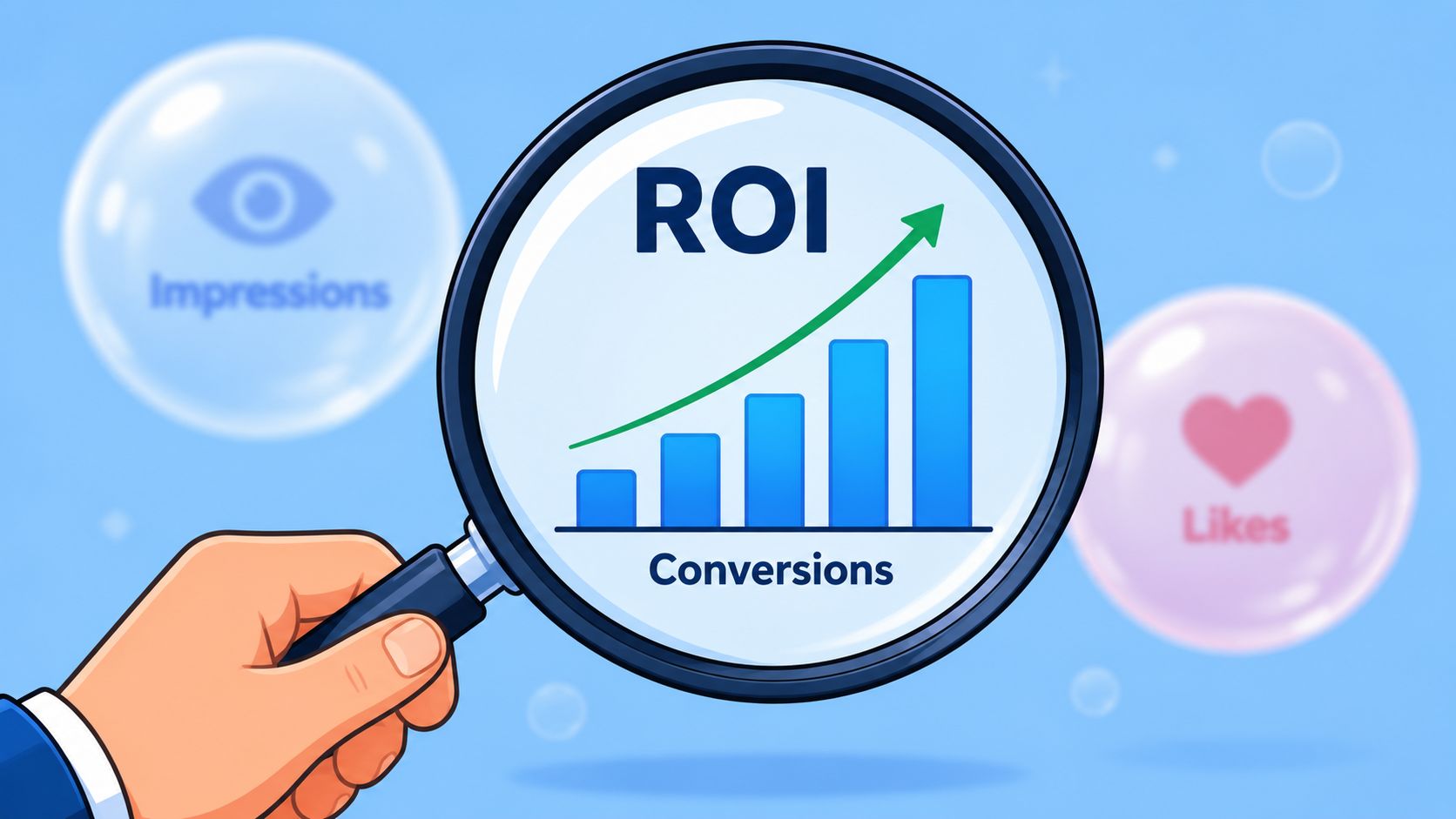
Activity reporting is where LinkedIn automation usually goes off the rails. Teams celebrate volume because volume is easy to count, then struggle to explain why booked meetings did not move.
If the goal is pipeline, the scorecard has to follow the buyer journey from first signal to revenue.
The only metrics worth reviewing every week
Verified benchmark data from Abstrakt's breakdown of good LinkedIn reply rates shows that standard LinkedIn outreach campaigns see connection acceptance rates of 25 to 30% and direct message reply rates of 10 to 15%. The same source notes that 20 to 30% of positive replies should convert into qualified meetings.
These numbers matter because each one points to a different operational problem.
- Connection acceptance rate shows whether the audience selection and request framing are strong enough to earn access.
- Direct message reply rate shows whether the opener creates enough relevance to start a conversation.
- Qualified meeting conversion shows whether those conversations are turning into sales opportunities instead of polite dead ends.
Low acceptance usually points to targeting, positioning, or weak familiarity before the request. Strong acceptance with weak replies usually means the message is generic, too long, or disconnected from the prospect's actual priorities. Positive replies that fail to become meetings usually expose a qualification gap, a slow handoff, or messaging that attracted curiosity without buying intent.
How attribution closes the loop
A lot of teams still stop measurement at the reply. That leaves money on the table because LinkedIn rarely works as a single-touch channel. A prospect may see two comments, visit the profile, accept the connection request three days later, and only respond after a post reinforces credibility.
That sequence should be visible in your reporting.
A usable attribution model tags each touchpoint to the same contact record so you can review the path, not just the final click. For example:
- A comment creates a profile visit.
- The profile visit leads to a follow.
- The follow precedes a connection acceptance.
- The acceptance leads to a DM reply.
- The reply becomes a booked meeting.
With that chain in place, teams can see which activities create commercial momentum. Without it, last-touch reporting gets too much credit and the trust-building work that warmed the account gets ignored.
I like a simple operating cadence here because complicated reporting rarely survives. Review the funnel once a week, review creative once a week, and push every meaningful interaction into the CRM fast enough for sales to act on it.
- Weekly funnel review. Check acceptance, positive replies, meetings, and opportunities by segment.
- Message-level analysis. Identify which openers produce qualified replies, not just any response.
- Comment-level analysis. Look for comments that repeatedly drive profile visits, follows, or inbound messages.
- CRM sync. Push accepted leads and qualified conversations into the sales workflow early so attribution does not break later.
A better question to ask each week is, “Which actions created pipeline, and should we do more of them?”
That shift changes behavior fast. A post with broad reach can still produce zero meetings. One well-placed comment on the right buyer's thread can influence a six-figure opportunity. Outcome-based reporting makes those differences obvious, which is exactly what leadership needs when they ask whether LinkedIn automation is producing revenue or just producing noise.
Put Your LinkedIn Growth on Autopilot
The teams that win on LinkedIn don't automate more aggressively. They automate more selectively.
They comment before they pitch. They use direct messages after context exists. They pace activity like a real person. They review performance through acceptance, replies, and meetings instead of send counts. Ultimately, they build a system that can prove which actions generate business results.
That's the essential standard for anyone trying to automate LinkedIn outreach in a serious B2B environment. Not whether a tool can send messages on a schedule. Whether it can support trust, protect the account, and create attributable pipeline.
Manual outreach still has a place. Human judgment belongs in account selection, message review, and live sales conversations. But daily LinkedIn work doesn't need to consume your calendar. Research, commenting, posting cadence, and lead tracking can run in a far more disciplined way when the workflow is designed around outcomes.
If your current setup feels noisy, it probably is. Strip it back. Start with high-fit audiences. Build public familiarity through comments. Keep direct outreach short and specific. Measure only what maps to pipeline. That's the version of automation that compounds.
If you're ready to grow LinkedIn while you sleep, Linqin gives you an AI agent built for comments-first audience growth, voice-matched posting, warm lead tracking, and analytics that tie engagement back to specific actions so you can see what's driving pipeline.