You open LinkedIn, click “Start a post,” and stall.
You know your work has substance. You've got opinions, experience, lessons, and stories worth sharing. But the blank page turns all of that into fog. Individuals often respond in one of two unhelpful ways. They either post nothing, or they publish something polished enough to be forgettable.
That's the challenge with how to write LinkedIn posts in 2026. It's not only about visibility. It's about saying something useful in a format people will read, while sounding like a real person instead of an AI-edited press release.
The fix is a system. Strong LinkedIn writing starts before the draft, gets sharper at the sentence level, and improves after publishing when you study what earned attention and conversation. The posts that work usually do three things well. They solve one small problem, they read cleanly on mobile, and they sound like they could only come from one person.
Table of Contents
- Plan Before You Post to Identify Your Core Topics
- Crafting LinkedIn Posts That Actually Stop the Scroll
- Develop an Authentic Voice That Resonates
- Optimize for Readability with Formatting and Visuals
- Master Your Timing, Cadence, and Engagement
- Scale Your LinkedIn Growth with AI and Analytics
Plan Before You Post to Identify Your Core Topics
The fastest way to lose momentum on LinkedIn is to decide your topic at the moment you sit down to write. That's when every idea feels too broad, too boring, or too self-promotional. Planning fixes that.
A good content plan starts with content pillars. These are the few repeatable themes you want to be known for. Most professionals do better with 3–5 core topics because that's wide enough to avoid repetition and narrow enough to stay coherent. If you need a model for shaping those themes into a consistent presence, this LinkedIn thought leadership guide is a useful reference point.
Build a small set of content pillars
Choose pillars that sit at the overlap of three things:
| Pillar filter | What to ask |
|---|---|
| Expertise | What do people already trust you to explain? |
| Commercial relevance | What topics connect to the work you want more of? |
| Repeatability | Can you post about this from multiple angles for months? |
For a B2B founder, the pillars might be product lessons, customer conversations, hiring decisions, and market observations. For a sales leader, they might be outbound messaging, deal reviews, team coaching, and buyer psychology.
The mistake is picking categories that are too vague. “Leadership” is too wide. “How I handle underperforming discovery calls” is usable. “Marketing” is too loose. “Why webinar follow-up breaks” is specific enough to turn into a real post.
Practical rule: If a pillar can't generate at least several distinct post angles from lived experience, it's too abstract.
Turn audience friction into post ideas
Once you have pillars, stop chasing giant topics. LinkedIn posts perform better when they solve one micro-problem per update, not a full category. That rule matters because readers don't arrive looking for a complete course. They arrive mid-scroll, looking for one useful insight.
Build a running list of micro-problems from places you already work:
- Sales calls: Note recurring objections, confusing questions, and moments where prospects hesitate.
- Client work: Capture the mistakes you keep correcting and the patterns you keep seeing.
- Team discussions: Turn internal debates into external lessons, minus confidential details.
- Inbox and DMs: Repeated questions often point to ideal post topics.
- Your own workflow: If something slowed you down, other people probably deal with it too.
A simple planning grid works well:
- Pick one pillar.
- List the small problems people face inside it.
- Match each problem to a post angle.
- Choose the format that fits the idea.
That last step matters. One problem might work as a text post. Another needs a carousel because the idea unfolds in steps. Planning at this level removes the blank-page problem because you're no longer asking, “What should I post?” You're asking, “Which prepared idea do I publish next?”
Crafting LinkedIn Posts That Actually Stop the Scroll
You open LinkedIn, see a post that should be useful, and skip it after two lines. The advice might be solid. The writing gave you no reason to stay.
That is the primary job of the post structure. It has to earn attention before it can deliver value. On LinkedIn, that usually comes down to three parts: hook, body, and CTA.
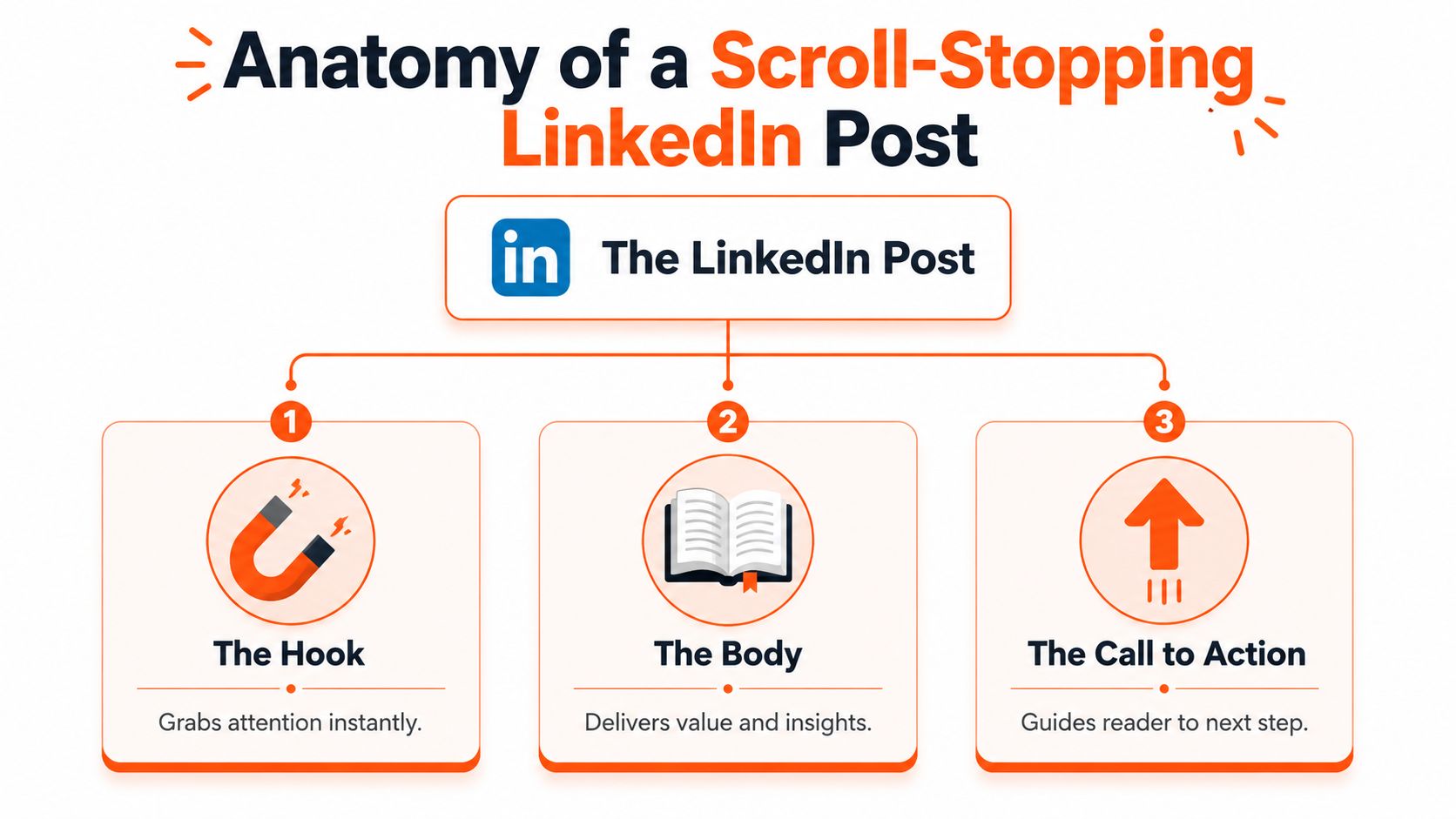
A practical standard from HyperClapper's LinkedIn post guide is useful here: write a strong hook, follow with one clear takeaway, keep the headline tight at 8 to 14 words, solve one micro-problem per post, include a specific CTA, and format for mobile with short paragraphs. If you want stronger opening patterns, this guide to LinkedIn post hooks that drive growth is a good reference.
Write the hook after you know the point
Writers get stuck when they try to open with a clever line before they know what they are saying. That is one reason the blank page feels so hard. The fix is simple. Draft the core idea first, then write the opening from the strongest sentence in the draft.
Weak hooks usually announce a topic:
- I'm excited to share something I learned this week.
- I recently had a conversation about leadership.
- Here are some thoughts on content strategy.
Strong hooks create tension, specificity, or a sharp opinion:
- LinkedIn posts lose readers when the writer crams in three lessons instead of one.
- I cut one sentence from a client draft and the post finally sounded human.
- The advice was fine. The format made it unreadable on mobile.
Good hooks do not act polished. They create a reason to keep reading. In practice, that often means leading with a mistake, a contradiction, a result you did not expect, or a sentence that sounds like an actual operator instead of a content machine.
Keep the body focused on one idea
The body has one job. Deliver the promised value without drifting.
Posts get weak when the writer tries to prove range, cover every angle, or stack extra takeaways into the same draft. That habit usually comes from good intentions. It still hurts readability. One post should solve one problem cleanly, especially on a platform where people are reading between meetings and on their phones.
Two body formats work well again and again:
| Body style | Best use |
|---|---|
| Story-based | When a client moment, sales call, or mistake reveals the lesson |
| Breakdown-based | When the value comes from a process, checklist, or decision rule |
Story example:
You shipped a post you thought would perform well. It fell flat. After reviewing the draft, you realized the opening was generic and the lesson arrived too late. That story carries the teaching without sounding manufactured.
Breakdown example:
You show the checklist you use before publishing: clear opening, one idea, proof from experience, short paragraphs, and a CTA that fits the post. The reader leaves with a repeatable system.
This is also where AI can help or hurt. AI is useful for pressure-testing structure, tightening phrasing, or generating alternate hooks. It weakens the draft when it smooths out the rough edges that make the post sound like a real person. If the body could have been posted by anyone in your niche, it needs more lived detail.
Short paragraphs help readability. Specificity is what keeps the post from sounding generic.
Use a CTA that creates a real response
The best CTAs match the kind of conversation the post earns. A strong educational post can ask for a pattern the reader has seen. A story post can invite a comparable experience. A contrarian opinion can ask the reader to choose between two approaches.
That is more effective than ending with “Thoughts?” and hoping people do the work for you.
Useful CTA types include:
- Invite a specific experience: What is one sign a LinkedIn post sounds AI-polished instead of human?
- Prompt a choice: Do you draft the lesson first, or the opening first?
- Ask for pattern recognition: Which hook would make you stop scrolling?
- Encourage a relevant share: Send this to someone rewriting their posting process.
The trade-off is straightforward. Broad CTAs feel easy to write, but they produce vague replies or none at all. Specific CTAs narrow the response, but they start better conversations. On LinkedIn, better conversations are usually the better bet.
Develop an Authentic Voice That Resonates
The biggest writing advantage on LinkedIn now isn't polish. It's recognizability.
People can feel when a post has been sanded down into generic competence. The sentences are neat. The structure is correct. The advice is impossible to disagree with. And nobody remembers it. That's why the strongest posts don't just communicate clearly. They carry fingerprints.
Use the only I could write this test
A useful standard from Windmill Growth's perspective on writing LinkedIn posts that don't sound like AI is the “only I could write this” test. The idea is simple. Before publishing, ask whether the post includes specific experience, a unique opinion, and a personal voice.
If one of those is missing, the post probably sounds interchangeable.
That doesn't mean every update needs a dramatic personal story. It means the reader should feel contact with a real operator. Your angle might come from a failed launch, a strange buyer objection, a message that changed your mind, or a lesson you learned too late.
If someone else in your niche could swap in their name and post the same text unchanged, the draft still needs work.
Human writing has texture
AI tends to produce uniform structure. Human writing has rhythm changes, rough edges, and selective specificity. That's often what makes a post trustworthy.
Three tactics make a visible difference:
- Use sentence fragments sometimes. Not for effect on every line. Just enough to sound spoken.
- Admit uncertainty when it's real. “I'm still testing this” is stronger than fake authority.
- Vary post length. Not every idea deserves the same structure or the same amount of explanation.
Another useful move is to keep one line in the draft that feels slightly less polished but more true. Many writers over-edit the sentence that had the most personality.
A voice people remember usually contains small signals of judgment. Not hot takes for the sake of attention, but actual preference. What you reject. What you've stopped doing. What you think most advice gets wrong.
That's how you stop sounding generated and start sounding known.
Optimize for Readability with Formatting and Visuals
Good writing loses reach when it looks hard to read. LinkedIn is consumed quickly, mostly on mobile, and the visual presentation of a post affects whether anyone gives your ideas enough time.
Formatting isn't decoration. It's delivery.
Format for mobile first
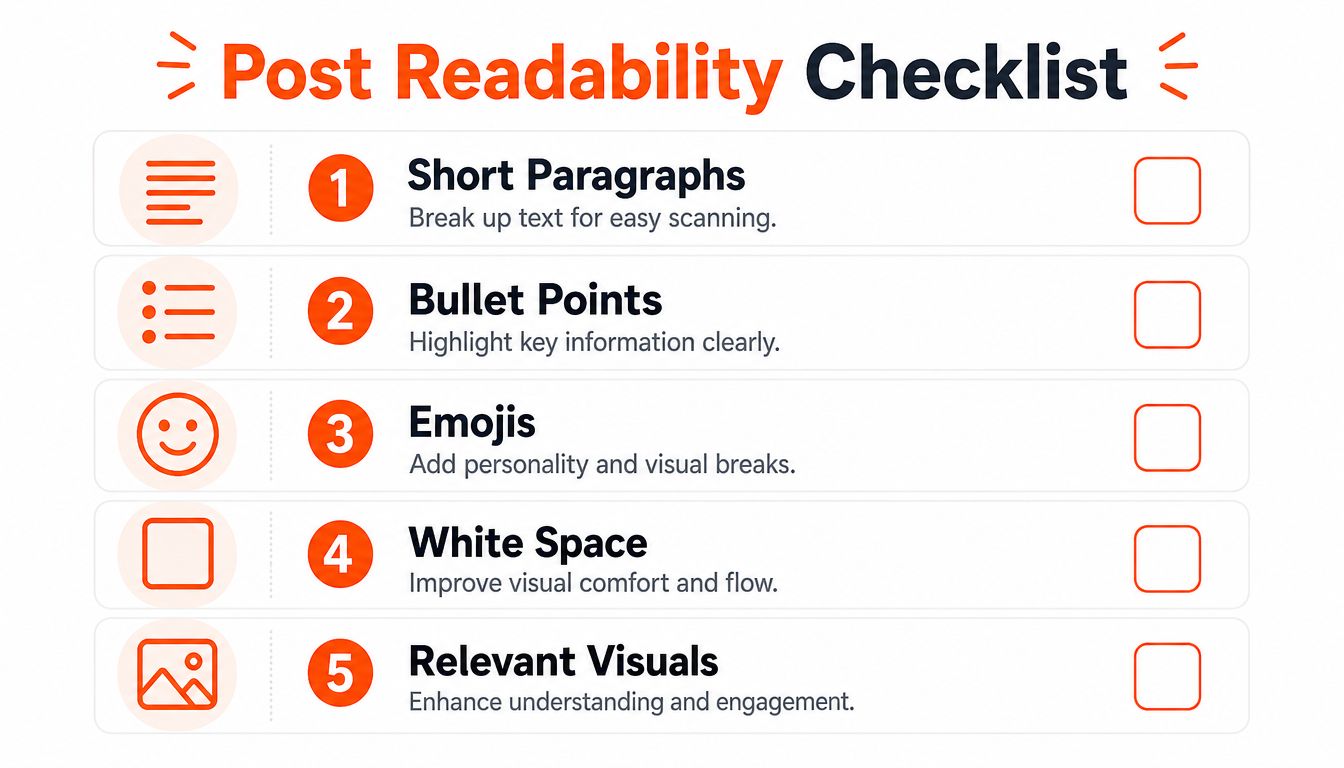
A simple finishing checklist catches most readability problems:
- Short paragraphs: Keep most paragraphs to one, two, or three sentences so the post scans easily.
- White space: Start a new line when the thought changes. Dense blocks lower completion.
- Bullet points: Use them when the value comes from steps, options, or contrasts.
- Selective emphasis: Bold only the key phrase or takeaway, not whole sections.
- Relevant visuals: Add a visual when it helps explain or package the idea, not just to fill space.
You don't need every post to look the same. In fact, visual sameness can become its own kind of fatigue. Some posts should feel like a short note. Others should read like a compact framework. Others deserve a document or carousel because the concept unfolds in parts.
A strong self-edit is to view the draft only as shape. Ignore the words for a moment. If the post looks heavy, it probably reads heavy too.
Use hashtags and visuals with restraint
Hashtags still matter, but overuse makes a post look spammy. A practical rule from Pressmaster's LinkedIn content strategy article is to use 1–5 hashtags per post and balance broad tags with niche tags. The same source also recommends tracking hashtag performance so you can keep the tags that help visibility.
A workable mix looks like this:
| Tag type | Role |
|---|---|
| Broad category tag | Helps position the post in a larger conversation |
| Niche tag | Reaches a more specific audience |
| Context tag | Ties the post to a use case, role, or specialty |
Visuals follow the same logic. Use them when they sharpen understanding or increase dwell time. Skip them when they add noise. A clean screenshot, a useful carousel, or a document with one idea per page can outperform a decorative graphic because readers can extract value directly from it.
Master Your Timing, Cadence, and Engagement
You publish a post you feel good about, check back two hours later, and it is flat. Usually the problem is not the idea. It is the operating system around the post: when it went live, whether you can sustain that cadence, and what happened in the comments while LinkedIn was deciding how far to distribute it.
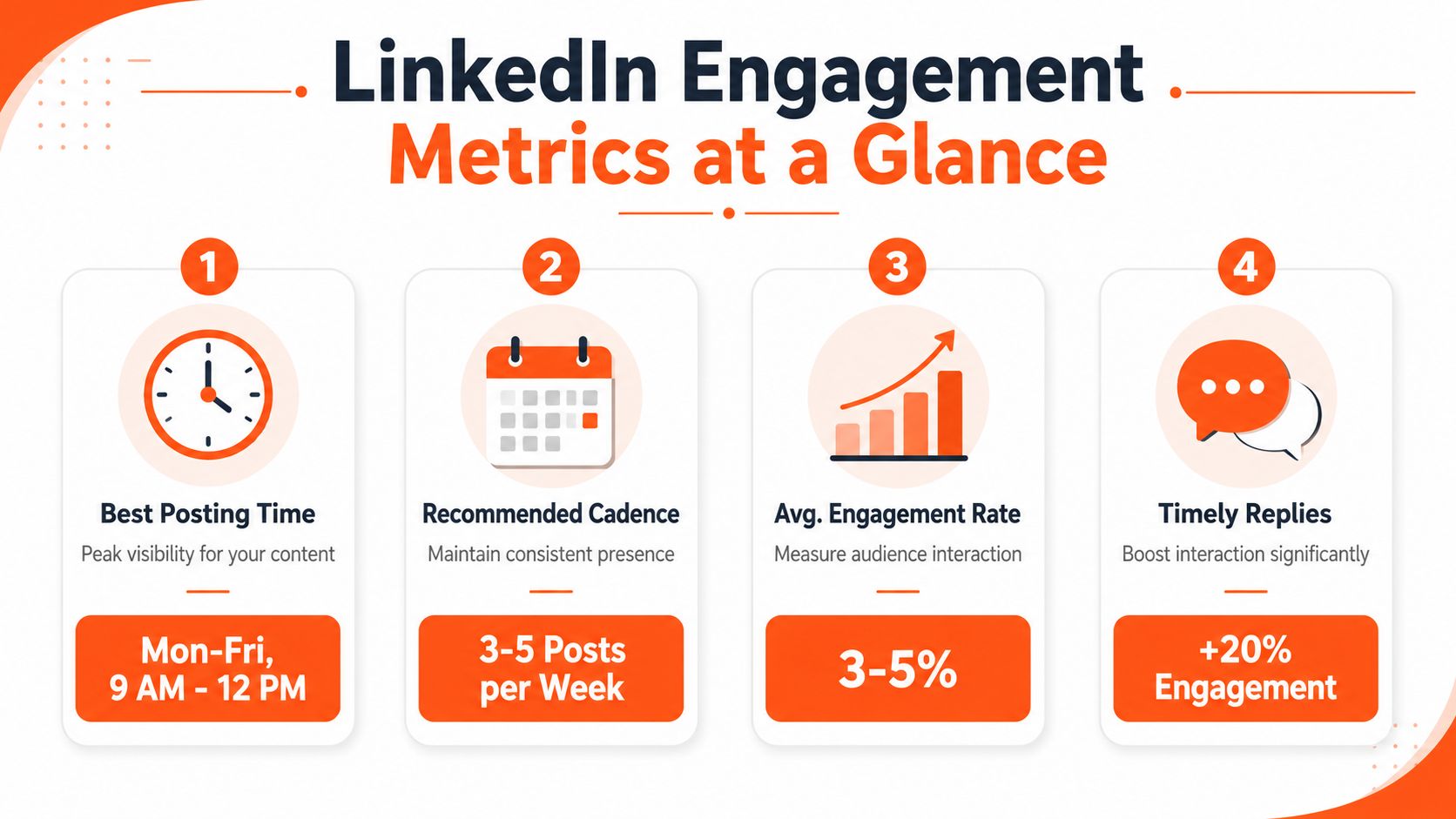
Timing matters, but consistency matters more. A posting schedule only works if you can maintain it without draining the quality out of your writing or sliding into generic AI phrasing that readers can spot instantly.
A practical rhythm for many professionals is three to five strong posts per week. That is enough volume to learn from patterns, stay visible, and keep your standards high. Mid-week mornings and lunch hours often perform well because people are active and in work mode, but there is no universal best time. Use broad platform patterns as a starting point, then adjust based on your audience and your own response data. If you want a clearer view of how distribution works, this guide to the LinkedIn algorithm and growth signals gives useful context.
Build a cadence you can actually keep
The blank page gets harder when posting feels like a daily performance test. Cadence solves that by turning publishing into a repeatable workflow.
Use a weekly rhythm like this:
- Choose topics before writing days: Pull from your running list of client questions, strong opinions, mistakes, wins, and lessons.
- Draft two or three posts in one session: This reduces startup friction and makes it easier to hear your own voice across multiple drafts.
- Schedule around your real week: If client work is heavy on Tuesdays, do not promise yourself daily posting.
- Leave room for live posts: Planned content builds consistency. Timely reactions keep you relevant.
This is also where AI can help or hurt. If you use it to speed up outlining, repurpose notes, or give yourself three angle options, it saves time. If you use it to write polished filler at scale, your cadence improves while trust drops. Readers are getting better at detecting content that sounds tidy but hollow.
Treat the first hour as distribution time
Publishing is not the finish line. It opens a short window where your job shifts from writing to conversation.
Stay available after posting if you can. Reply to early comments quickly. Ask one short follow-up question when someone adds a thoughtful point. Bring energy to the thread instead of dropping in a flat “thanks.”
That behavior does two things at once. It gives the post stronger early interaction signals, and it makes your comments section sound like a real person is behind the account.
LinkedIn's own guidance on driving meaningful engagement in comments recommends prompt, thoughtful replies and following up within a day so the discussion keeps moving.
A simple response system works well:
- Be present for the first round of comments.
- Reply with substance, not just acknowledgment.
- Pull good commenters deeper with a question or example.
- Revisit the thread later the same day or the next morning.
- Note which comments reveal future post ideas.
The comments section is part of the post. On LinkedIn, many readers judge your voice as much by how you reply as by what you publish.
That matters even more now because polished content gets less trust than it used to. The fastest way to sound human is not clever formatting. It is specific, engaged follow-through.
Scale Your LinkedIn Growth with AI and Analytics
Most professionals don't fail on LinkedIn because they lack ideas. They fail because execution gets fragmented. Research takes time. Drafting takes time. Commenting takes time. Then the analytics are too fuzzy to show what moved the needle.
That's where AI helps, if you use it correctly.
Use AI for leverage, not for voice replacement
The wrong use of AI is obvious. You paste in a prompt, get a polished draft, make tiny edits, and publish something that sounds technically fine and personally empty.
The better use is operational. Let AI reduce the repetitive parts while you keep ownership of judgment, stories, and voice. In practice, that can mean:
| Task | Better role for AI |
|---|---|
| Idea expansion | Turn a rough note into a few possible angles |
| Drafting | Produce a first version you can reshape with real examples |
| Comment discovery | Find relevant conversations worth joining |
| Scheduling | Maintain consistency without posting manually every day |
| Analysis | Connect outputs to profile visits, replies, and warm leads |
One option in this category is Linqin, which can draft posts in your voice, identify relevant conversations, automate commenting, and tie engagement back to specific actions through analytics. That makes it useful for teams and operators who want a repeatable system instead of relying only on manual effort. If you want context on how distribution works before automating any part of it, this LinkedIn algorithm growth guide is a helpful companion.
A good rule is to treat AI drafts the way you'd treat research notes. Useful raw material. Not finished writing.
Measure which actions create business value
The mature way to handle LinkedIn is to stop judging success by vibes. You need to know which posts led to profile visits, which comments brought the right people to your page, and which themes created conversations with actual business relevance.
That doesn't require chasing vanity metrics. It requires attribution.
Useful review questions include:
- Which post topics consistently generate substantive comments?
- Which formats lead to more profile interest?
- Which comments on other people's posts attract the right audience?
- Which draft patterns make your writing sound too uniform?
- Which calls to action lead to genuine replies instead of shallow engagement?
AI can help here too, especially when it organizes activity into a system you can inspect. The point isn't automation for its own sake. It's removing blank-page dread, keeping your cadence steady, and learning from real audience response instead of guessing.
Here's a quick product walkthrough for that kind of workflow:
If you want a setup that keeps posting, commenting, and measurement connected, the goal is simple. Use AI to save time on the mechanics, then spend that saved time sharpening the parts only you can provide: point of view, specificity, and follow-up.
If you want a practical system to draft posts in your voice, stay consistent, and turn LinkedIn activity into measurable outcomes, take a look at Linqin.