From Profile to Pipeline: Eight LinkedIn Growth Tactics That Drive Results
This section distills eight proven LinkedIn growth tactics into a practical, action oriented framework. Aligning a well-optimized profile with real world methods can turn visibility into meaningful engagement and a steady pipeline of leads. The strategies below draw on industry best practices, benchmark data, and evergreen principles that have consistently delivered results for professionals and teams across sectors.
-
Profile optimization as a conversion hub
Treat your LinkedIn profile as a landing page for your value proposition. Ensure your headline communicates a clear outcome, not just a job title, and relocate the most important details to top sections. Use a clean, professional photo, a banner that reinforces your niche, and an About section written with the buyer in mind.
- Craft a headline that answers: what you do, for whom, and what outcome you yield.
- Place proof and results in the About and Featured sections to reduce friction.
- Keep your profile public for discoverability on and off LinkedIn.
-
Content mix that informs, not just promotes
Diversify beyond link posts to include multimedia formats that resonate in scroll driven feeds. Combine snackable visuals, short videos, carousels, and thoughtful long form articles to educate and illustrate your expertise.
Content Type Why it works Best practices Carousels Encourage swiping and engagement 5-10 slides, actionable steps, data visuals Short videos Higher reach and retention 1 minute or less, clear hook in first 3 seconds Images and graphics Fast comprehension Bold visuals, minimal text, consistent branding Long form articles Establishes authority Structured with sections, data and takeaways -
Audience focus and ICP driven targeting
Define your ideal customer profile and tailor content to their pains and opportunities. Use audience signals from engagement data to refine topics, formats, and posting times.
- Map buyer personas to content pillars
- Track impressions, engagements, and follower quality by ICP
- Adjust messaging to mirror the language of your target audience
-
Consistency with a disciplined posting cadence
Regular presence beats bursts of activity. Establish a sustainable rhythm that fits your team capacity and audience expectations.
Cadence Rationale Measurement 3 posts per week Balanced visibility without overwhelming followers Engagement rate per post Peak hours testing Leverages audience activity windows Best performing days and times -
Employee and advocate amplification
Turn your team into content multipliers. Employee advocacy expands reach, builds trust, and accelerates relationship building with prospects.
- Provide ready to share posts and talking points
- Encourage authentic posts from subject matter experts
- Recognition and incentives for active participation
-
Strategic partnerships and cross pollination
Collaborate with external voices and organizations to access new audiences. Co authored posts, joint webinars, and LinkedIn Live sessions can extend reach beyond your existing network.
- Feature customer champions and partners in posts
- Co host events and share case studies
- Repurpose partner content into complementary formats
-
Engagement driven growth and social listening
Growth on LinkedIn is a two way street. Thoughtful commenting, timely responses, and listening to industry conversations generate impressions and position you as a responsive leader.
- Comment value add on relevant posts in your niche
- Use prompts to spark discussion and invite collaboration
- Monitor industry chatter to identify content gaps you can fill
-
Data informed iteration and optimization
Regular analysis of what works guides incremental improvements. Track key metrics and use findings to refine topics, formats, and posting times.
Metric Action Tooling Impressions Identify top performing topics and formats LinkedIn analytics, third party dashboards Engagement rate Refine hooks and CTAs Post insights, comment analytics Follower quality Prioritize ICP aligned content Audience insights, profile viewers
The eight tactics above are designed to work in harmony, turning a well-optimized profile into a reliable pipeline of engagement and qualified opportunities. By combining profile fundamentals with diversified content, targeted outreach, social proof, and continuous learning, you can achieve scalable LinkedIn growth that moves beyond vanity metrics toward sustainable business impact.
LinkedIn SEO — Use Relevant Keywords
LinkedIn SEO — Use Relevant Keywords
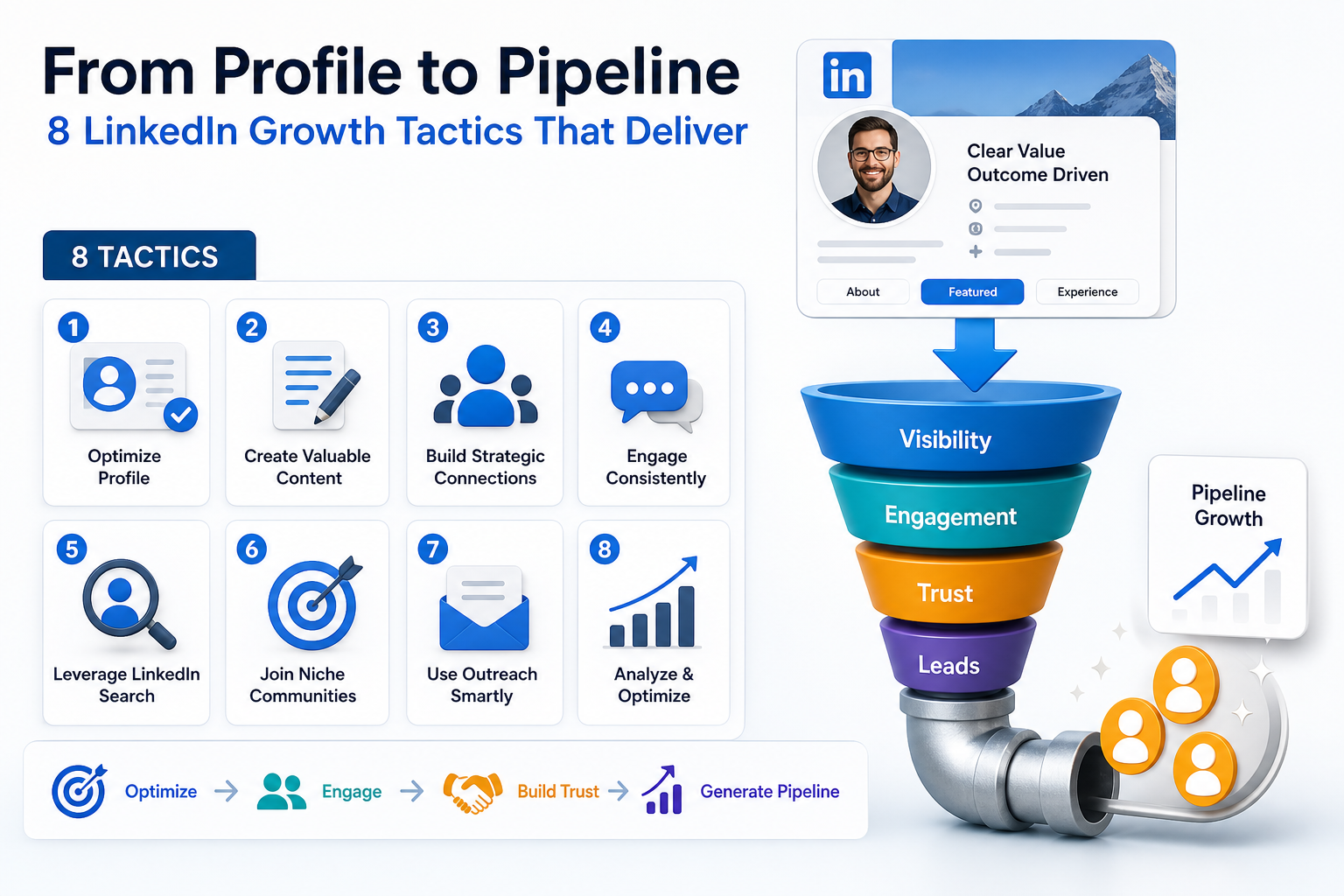
Think of your LinkedIn profile as a living SEO asset. When ICPs search for solutions, the goal is to appear at the moments when intent is highest. This means embedding the right keywords where they matter most: in your headline, About section, skills, and experience. By treating LinkedIn like a search surface, you increase discoverability not only within LinkedIn search but also in external search engines. The result is more qualified visits from people who are truly in your target buying or collaboration funnel.
Approach this with a simple, repeatable process that mirrors classic SEO workflows:
- Identify target keywords that your ICPs would search for when looking for your services, expertise, or outcomes.
- Map keywords to profile sections so each term appears in the most impactful places without sounding forced.
- Study peer profiles and industry leaders to uncover terms that perform well in your niche.
- Monitor results and refine based on profile views, searches, and engagement signals.
Keyword research on LinkedIn does not require a formal tool every time. You can start with a thoughtful, analog process that yields strong results:
| Step | What to Do | Where to Place Keywords |
|---|---|---|
| 1. Brainstorm seed terms | List terms your ICPs would type to find solutions like yours | Headline, About, Skills |
| 2. Analyze peer profiles | Identify frequently used terms in top profiles in your niche | About, Experience, Recommendations |
| 3. Validate intent | Cross-check terms against real search behavior in LinkedIn search suggestions | Headline, About, Featured |
| 4. Prioritize long tail phrases | Target specific outcomes and industries to reduce noise | Headline, About, Posts |
Implementation guidance to weave keywords naturally:
- Headline optimization — craft a result oriented headline that answers what you do, for whom, and what outcome you deliver. Example structure: Helping ICPs achieve [outcome] with [method].
- About section alignment — introduce the problem you solve using your primary keywords, then describe your approach and the tangible results you drive. Use two to three core keywords and related variants.
- Experience and skills integration — incorporate keywords in role descriptions and in the skills area to improve discoverability when others search for those terms.
- Content signals — publish posts and articles that naturally include your target keywords in context, reinforcing relevance in both profile and feed discovery.
Best practices to sustain keyword health without sounding robotic:
- Maintain readability — prioritize natural language and clear value statements over keyword stuffing.
- Balance breadth and specificity — mix broad industry terms with precise niche phrases to attract both general and highly qualified audiences.
- Monitor shifts — keep an eye on changing industry language and update your profile to reflect new concepts or services.
- A/B test elements — experiment with alternative headlines or About phrasing to identify which combinations yield more profile views or inbound messages.
By applying LinkedIn SEO practices to your profile, you illuminate the path from passive visibility to active discovery. When keywords align with your ICPs’ search behavior, you create a durable foundation for ongoing traffic, meaningful connections, and a stronger pipeline of opportunities.
Custom LinkedIn Profile URL
Custom LinkedIn Profile URL
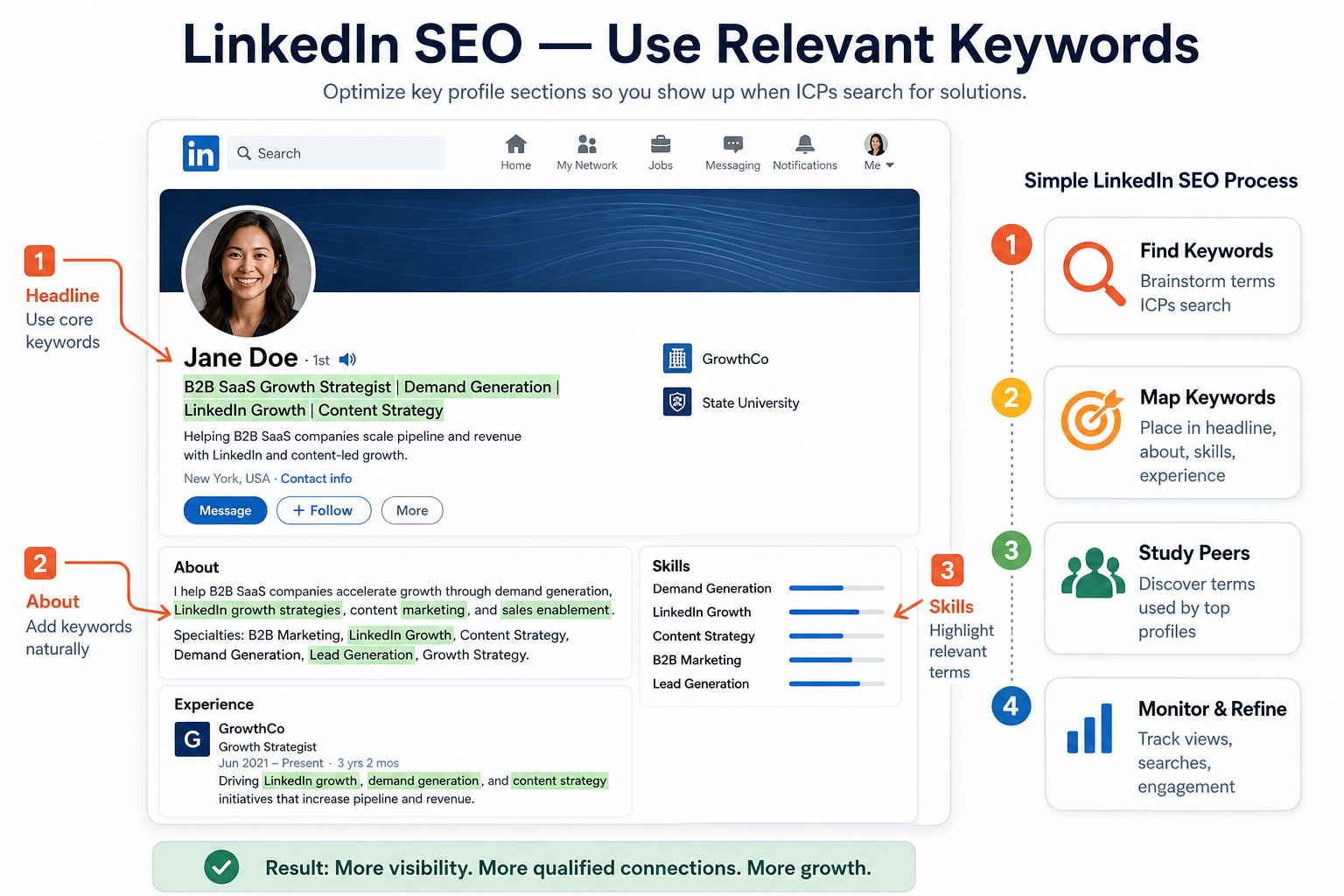
Turning a long, messy LinkedIn URL into a clean, professional address is a small change with big impact. A customized URL looks more credible when you share it in emails, PDFs, or slide decks, and it also improves discoverability on LinkedIn and external search engines. When your profile URL mirrors your name or brand, it reinforces your personal or company identity and makes it easier for prospects and recruiters to find you.
Practical advantages include:
- Professionalism — a tidy URL projects credibility and attention to detail.
- Search visibility — clean URLs tend to rank more predictably in Google and LinkedIn search results.
- Brand consistency — using your actual name or business handle strengthens consistency across marketing touchpoints.
Here are the concrete steps you can follow to customize your LinkedIn profile URL, along with tips to maximize its impact:
-
Access the URL customization feature
- Navigate to your LinkedIn profile page.
- Open Public profile and URL or Edit public profile & URL in the settings area.
- Click to edit the URL that appears at the end of the address bar.
-
Choose a clean, memorable URL
- Use your name if available, for example linkedin.com/in/john-doe.
- If your name is common, add a minimal suffix that remains professional, such as /john-doe-collective or /jdoe_saas.
- Avoid random numbers or special characters that complicate recall or typing.
-
Confirm availability and save
- LinkedIn will indicate if the exact URL is already taken. If so, choose the closest clean variant.
- Save changes and verify the new URL loads correctly from a new browser tab.
-
Promote the new URL across touchpoints
- Update your email signature, business cards, and website bios with the new link.
- Use the URL consistently in outreach, proposals, and content assets to reinforce recognition.
A quick reference guide to the impact of the change is shown below.
| Aspect | What to Do | Expected Benefit |
|---|---|---|
| URL format | Change to a simple, name-based path | Enhanced memorability and trust |
| Brand alignment | Incorporate your name or brand in the slug | Stronger cross-channel consistency |
| Public visibility | Ensure the profile remains public | Better discoverability on Google and LinkedIn |
| Promotion | Update signatures and bios | Increased profile visits and connection requests |
Example transformation:
- Before: https://www.linkedin.com/in/john123456789
- After: https://www.linkedin.com/in/john-doe
Keep this practice as part of your ongoing profile hygiene. A clean LinkedIn profile URL is a small detail that signals professionalism, improves search visibility, and supports a cohesive personal or brand narrative across digital channels.
Strong Headline
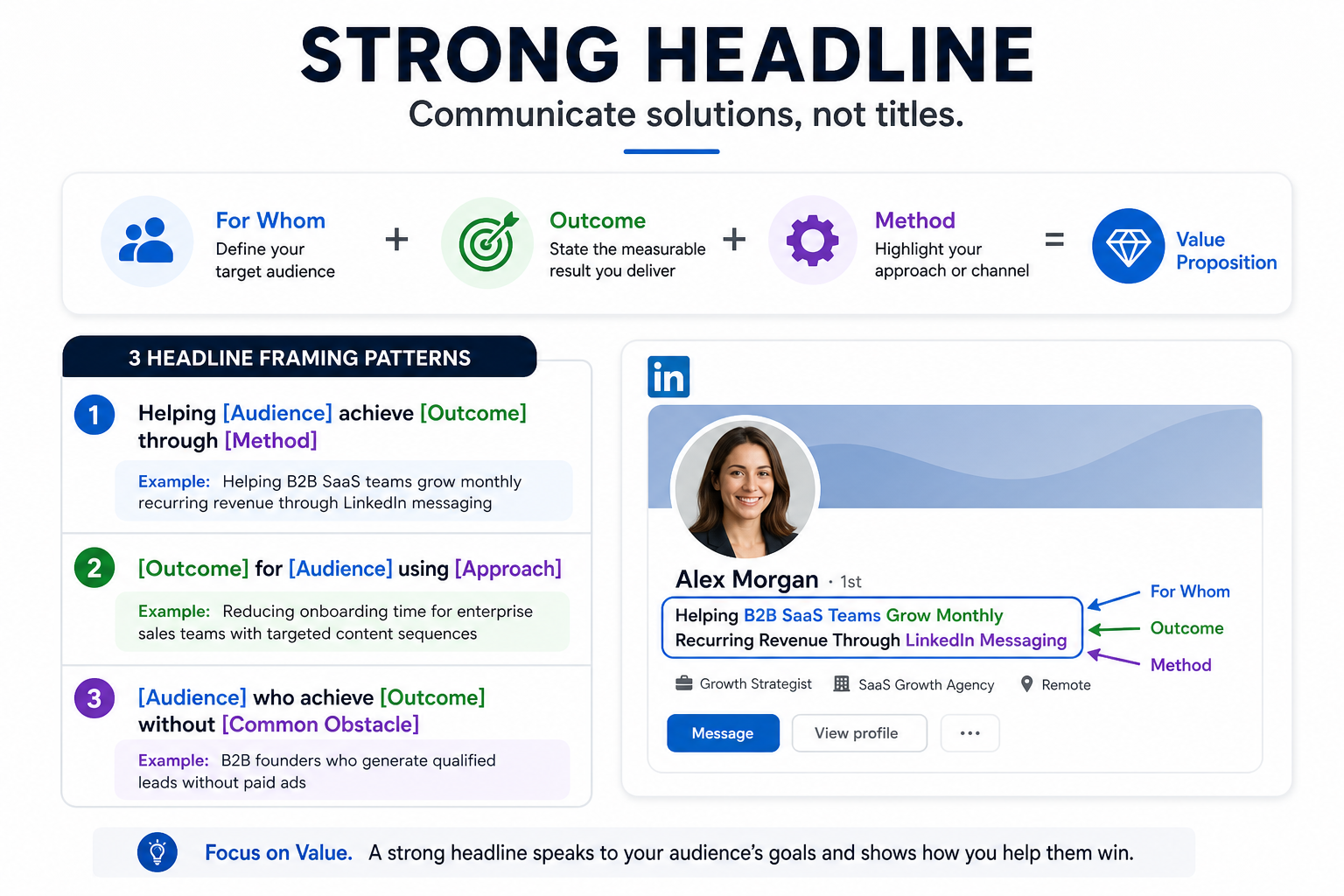
A strong LinkedIn headline should communicate the value you deliver, not just your job title. Instead of listing a role, your headline should answer the core question a potential connection or client is asking: what outcome can you help them achieve and for whom. When your headline centers on a tangible result and a clearly defined audience, it signals to readers that engaging with you will move their priorities forward.
To translate this into practice, structure your headline around three elements:
- What you do for whom — identify the target audience to ensure relevance and reduce ambiguity.
- The outcome — specify the measurable result or significant benefit you help achieve.
- The method or approach — optionally include the primary tactic or channel you use to deliver the outcome.
When these elements come together, your headline moves from a title to a value proposition. Below are concrete framing patterns you can adapt. Each example uses a target audience and a concrete outcome to demonstrate the shift from role to solution.
- Pattern 1: Helping [Audience] achieve [Outcome] through [Method]
Example: Helping B2B SaaS teams grow monthly recurring revenue through LinkedIn messaging - Pattern 2: [Outcome] for [Audience] using [Approach]
Example: Reducing onboarding time for enterprise sales teams with targeted content sequences - Pattern 3: [Audience] who achieve [Outcome] without [Common Obstacle]
Example: Marketing leaders who generate qualified inbound demos without cold calling
Practical headline rewrites demonstrate the shift from a position to a promise. Compare these before and afters to feel the difference:
- Before: CEO at Example Company
- After: Helping B2B software teams close deals faster with LinkedIn outreach
- Before: Growth Manager
- After: Generating 10- to 30-qualifying meetings per month for SaaS startups via targeted LinkedIn campaigns
- Before: Marketing Director
- After: Driving 40% higher webinar attendance for professional services firms using optimized audience hooks
Beyond structure, the language in a value focused headline should reflect outcomes that resonate with your ICPs. Use verbs that imply movement and impact, such as generate, accelerate, reduce, optimize, or unlock, and pair them with concrete figures or levels of impact whenever possible.
Finally, test and refine your headline as you learn more about what prompts profile views and inbound messages. Small tweaks to audience descriptors or the stated outcome can yield meaningful shifts in response, so treat your headline as an evolving asset in your growth toolkit.
Professional Headshot
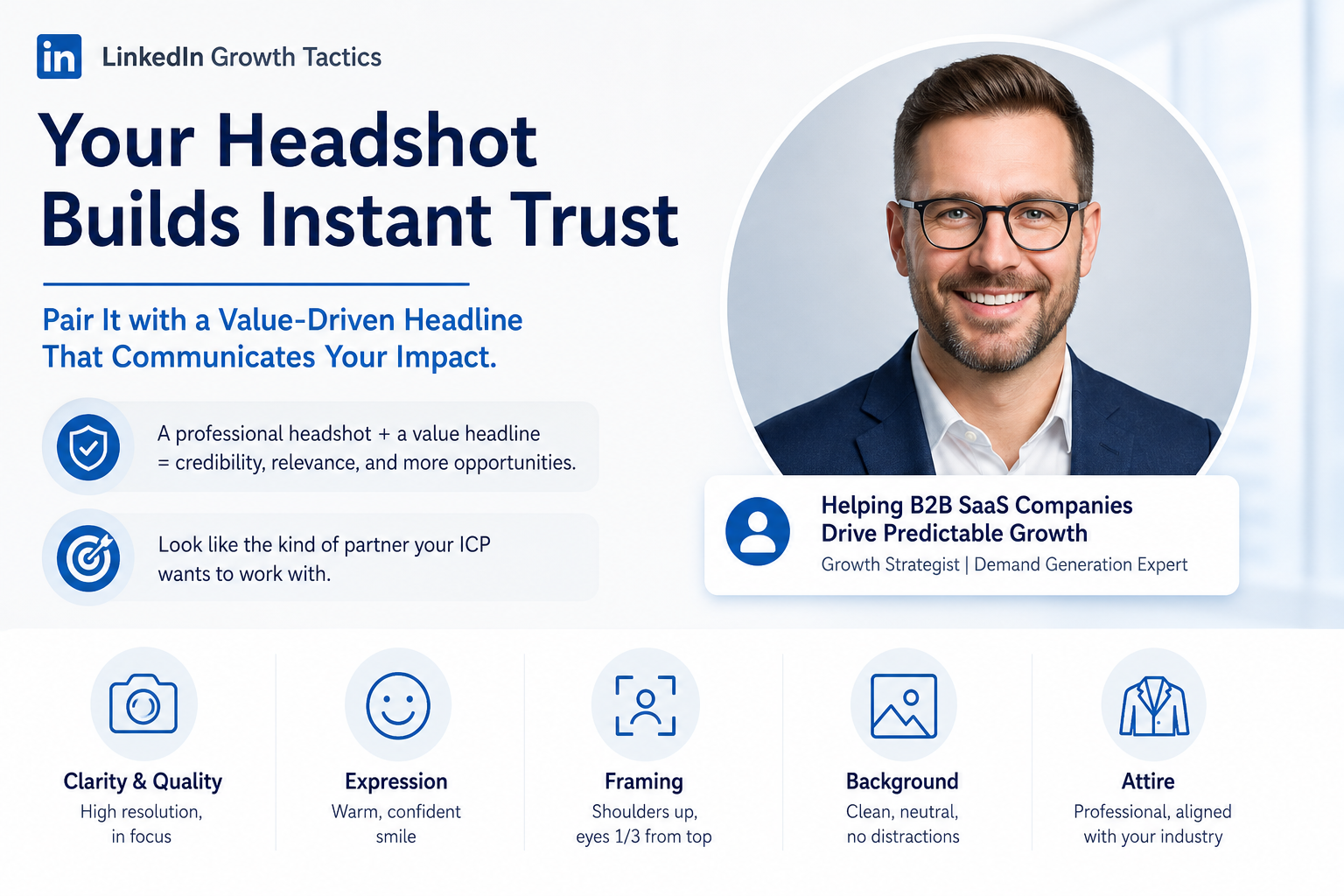
A clear, professional headshot is the visual handshake that instantly builds trust with your audience. On LinkedIn, where prospects form first impressions within seconds, your photo serves as the gateway to deeper engagement. When paired with a value oriented headline, your profile communicates competence and approachability in a single glance, setting the stage for the growth hacking tactics that follow.
The goal is to convey credibility and approachability at the same time. A strong headshot signals that you are present, professional, and ready to help your ICP solve meaningful problems. In practice, this means choosing an image that aligns with your niche, avoids distractions, and presents you as the kind of partner a visitor would want to do business with.
- Clarity and quality — use a high resolution image where your face is clearly visible and in focus.
- Expression — a warm, confident expression with a genuine smile increases approachability.
- Framing and composition — crop to the shoulders or chest with your eyes roughly one third from the top for strong composition.
- Background — opt for a clean, neutral background that minimizes distraction and keeps attention on you.
- Attire — wear professional clothing that matches your industry and the audience you serve.
The pairing rule is simple: your headshot should harmonize with a headline that communicates value. If your image conveys trust and warmth, ensure the headline reinforces the benefit you deliver and the ICP you serve.
Practical guidance for getting the match right:
| Aspect | Best Practice | Why it matters |
|---|---|---|
| Image quality | High resolution, natural lighting, minimal shadows | Sharper appearance signals professionalism and reliability |
| Framing | Head and shoulders, eyes near upper third | Balances presence with approachability |
| Background | Solid or softly blurred neutral background | Reduces visual noise and keeps focus on you |
| Expression | Genuine smile or confident neutral | Builds trust and invites conversation |
| Attire | Industry-appropriate, solid colors, minimal accessories | Projects competence and aligns with your niche |
| Consistency | Use the same headshot across profiles and assets | Strengthens personal brand recognition |
In addition to the photo, ensure your accompanying headline speaks to value. Craft a headline that answers who you help, the outcome you enable, and the method you use, so that visitors immediately see the payoff of connecting with you.
Example framing patterns you can adapt:
- Audience to outcome — Helping ICPs achieve [Outcome] through [Method]
- Outcome with approach — [Outcome] for [Audience] using [Approach]
- Problem to solution — Solid results for [Audience] by solving [Problem] with [Technique]
By aligning a professional headshot with a value focused headline, you create a compelling visual and verbal signal. This accelerates connection, engagement, and, ultimately, growth through the LinkedIn Growth Tactics you deploy.
LinkedIn Banner
LinkedIn Banner
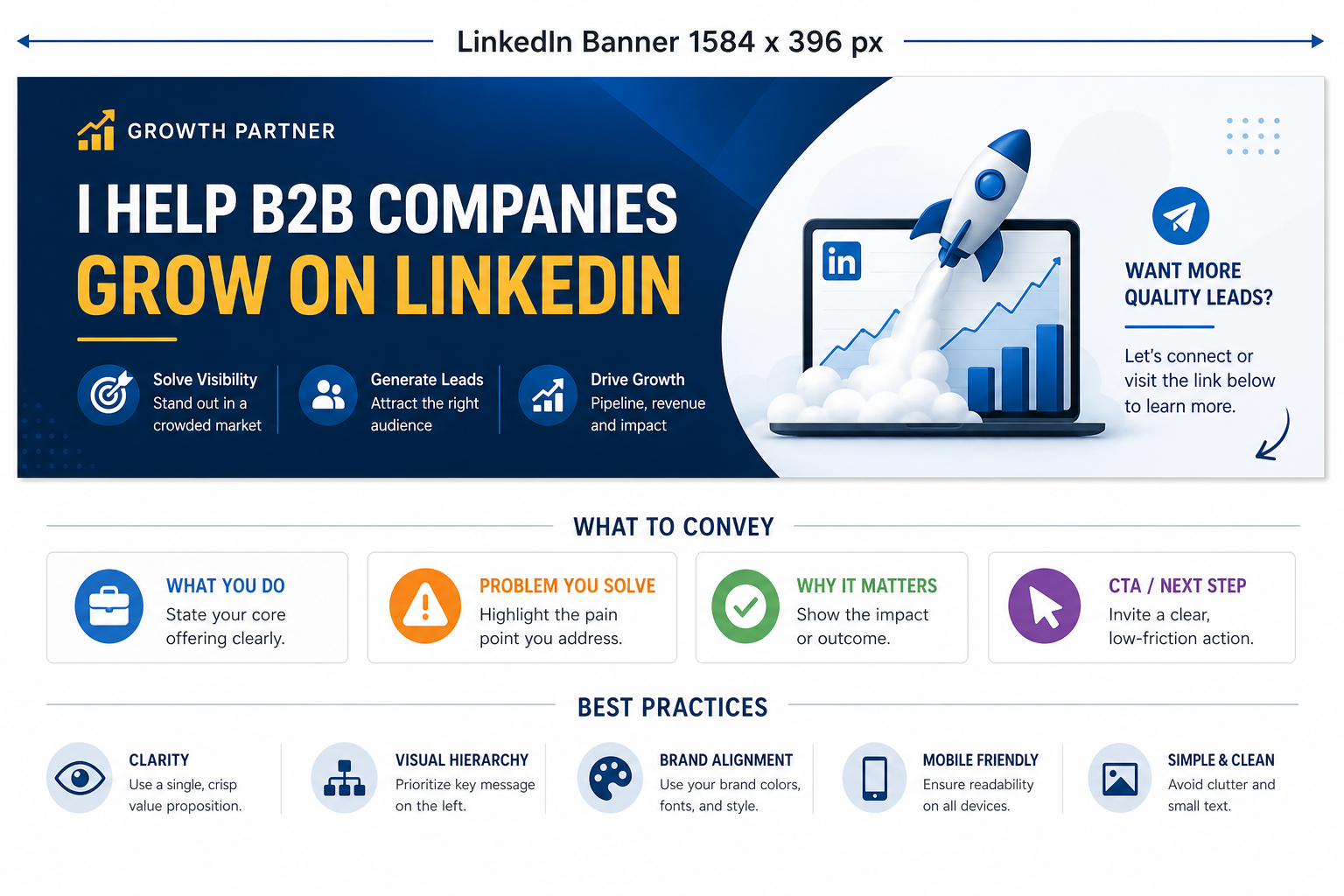
The banner space on LinkedIn, measuring 1584 by 396 pixels, is prime real estate for instantly signaling your value proposition. Rather than leaving this area blank or cluttered with generic branding, use the banner to succinctly communicate what you do, the problem you solve, why it matters, and a clear call to action. When designed with intention, this banner becomes a visual elevator pitch that supports your profile headline and About section, accelerating initial interest and guiding visitors toward the next step.
What to convey in the banner
- What you do — state your core offering in a concise, impact oriented phrase.
- The problem you solve — highlight the pain point or outcome your audience cares about.
- Why it matters — include a brief indicator of the value or consequence of solving the problem (e.g., saving time, boosting revenue, reducing risk).
- CTA or directional cue — invite a specific next step such as visiting a resource, booking time, or downloading content, without requiring a sale from the first touch.
Best practices for banner design
| Element | Guidance | Why it matters |
|---|---|---|
| Clarity | Use a single, crisp value proposition in large type. | Instant comprehension as visitors skim your profile. |
| Visual hierarchy | Place the most important message at the left third of the banner and use contrasting colors. | Guides attention to the core offer quickly. |
| Brand alignment | Maintain brand colors, typography, and style consistent with your website and other assets. | Strengthens recognition and trust across channels. |
| CTA visibility | Include a subtle CTA such as “Learn more,” “Book a quick consult,” or “Download the guide.” | Encourages engagement without coming across as pushy. |
| Imagery and icons | Use simple icons or a clean graphic that reinforces the message without clutter. | Enhances memory and quick understanding on mobile and desktop. |
Content structure you can adapt
- Line 1 — A concise statement of what you do, e.g., “LinkedIn growth for B2B teams.”
- Line 2 — The problem you solve, e.g., “Turning dormant profiles into pipeline-ready leads.”
- Line 3 — Why it matters, e.g., “Drive sustainable inbound opportunities with less overhead.”
- Line 4 — CTA hint, e.g., “Learn how in our free guide” or “Book a 15 minute strategy session.”
Implementation tips for maximizing impact:
- Test variations — try two or three banner variations and monitor profile views and click-through indicators over a few weeks.
- Keep it mobile friendly — ensure key text remains legible on smaller screens by avoiding overly narrow typography or critical information near edges.
- Avoid clutter — prioritize a clean composition; reserve space for your profile photo and headline to breathe.
- Coordinate with other sections — align the banner message with the About section and Featured content so the narrative feels cohesive from first glance to deeper reading.
By treating the LinkedIn banner as a strategic communications touchpoint, you create an immediately interpretable snapshot of value. When visitors understand who you help, the problem you address, why it matters, and what to do next within moments of arriving at your profile, you increase the likelihood that they will engage further and move along the growth funnel.
Featured Section
Featured Section
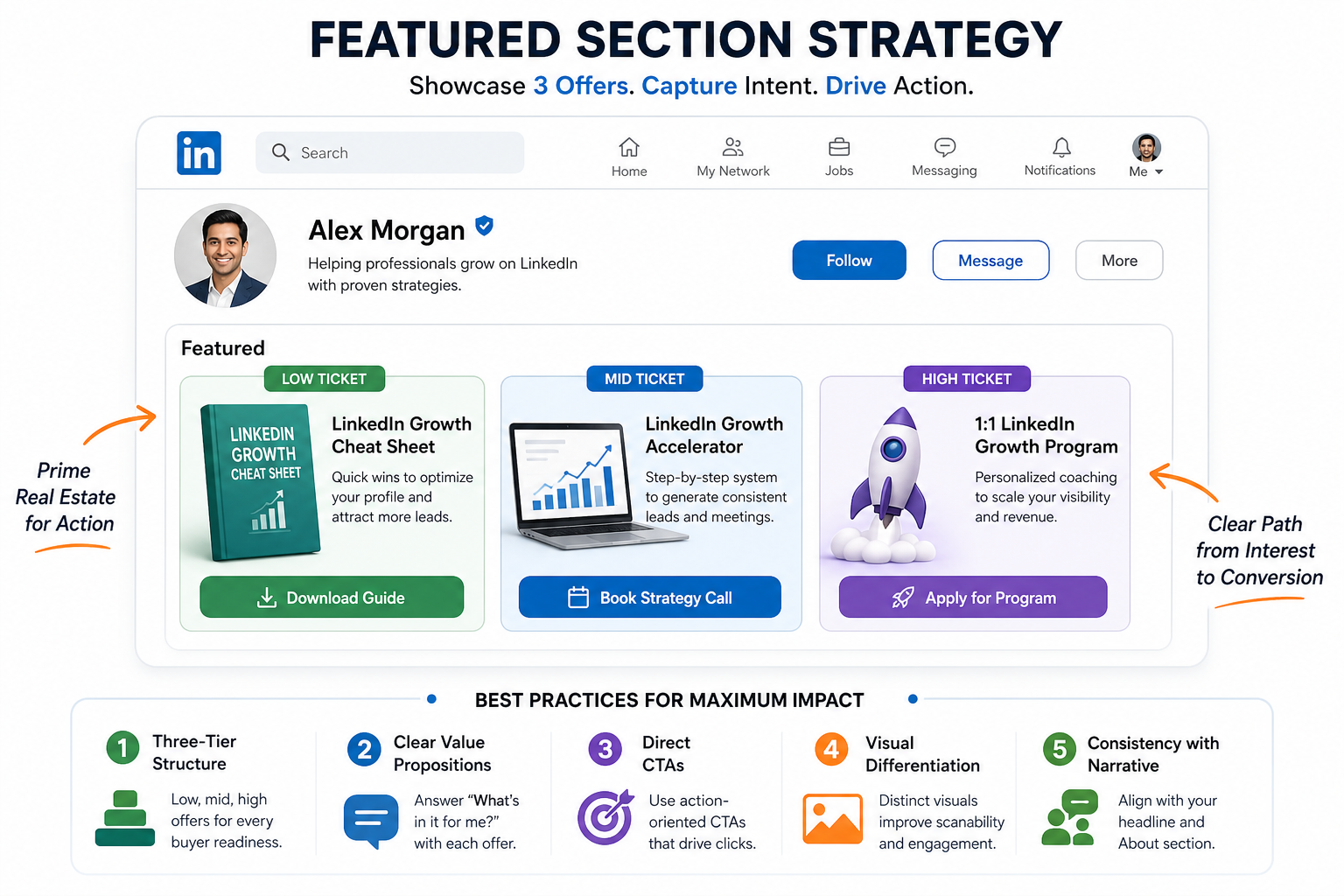
The LinkedIn Featured area is prime real estate. Visitors often overlook it, yet it acts as a direct gateway to action. Curate this space to showcase your top offers and capture intent the moment a visitor lands on your profile. By presenting a low risk entry point, a mid-tier option for deeper engagement, and a high value offering for serious buyers, you create a clear path from interest to conversion. This approach mirrors growth hacks that favor immediate usability and measurable results.
How to architect the Featured section for maximum impact:
- Three-tier offer structure — place a low ticket entry, a mid ticket accelerator, and a high ticket program in prominent positions to cover varying levels of buyer readiness.
- Clear value propositions — accompany each offer with a concise benefit statement that answers the visitor’s question, “What’s in it for me?”
- Direct CTAs — include concrete calls to action such as “Download the guide,” “Book a strategy session,” or “Apply for the program.”
- Visual differentiation — use distinct cover imagery or thumbnails for each offer to reduce cognitive load and improve scannability.
- Consistency with narrative — ensure the Featured picks align with your About section and headline so visitors see a cohesive value proposition.
Proposed structure for the three tiers in the Featured section:
| Tier | Deliverables | Ideal Buyer | CTA |
|---|---|---|---|
| Low-ticket | Intro resource or mini engagement option (e.g., free guide, newsletter, or template) | New visitors or early-stage prospects exploring your value | Download now or join the newsletter |
| Mid-ticket | Scaled engagement such as a short workshop, audit, or 1 on 1 assessment | Prospects with identified interest ready to evaluate impact | Book a discovery call or register for a masterclass |
| High-ticket | Comprehensive program or offering with measurable outcomes | Qualified buyers ready to commit to a longer engagement | Apply or schedule a strategy session |
Implementation tips to maximize results from the Featured section:
- Place the most compelling offer first — order your items so the low-ticket option grabs attention, followed by the mid-tier and high-ticket, ensuring a quick progression path.
- Use outcome oriented headlines — craft concise titles that state the specific result each tier delivers.
- Embed social proof where possible — include a brief client outcome or stat within the description to boost credibility.
- Coordinate with content assets — ensure the topics of the offers echo the themes in your recent posts and articles.
- Track engagement and conversion — monitor clicks, saves, and subsequent actions to refine the offers over time.
Example copy framework you can adapt for each tier without naming specific promotions:
- Low-ticket — Short resource to kickstart value and qualify interest — CTA: Download the guide
- Mid-ticket — Hands on engagement to demonstrate impact — CTA: Book a strategy session
- High-ticket — Comprehensive program with defined outcomes — CTA: Apply for the program
By organizing a Featured section that presents low, mid, and high-ticket options, you empower visitors to take immediate, appropriate action. This aligns with growth hacking principles and reflects a proven approach to turning profile real estate into an actionable pipeline, reducing friction and speeding progress from curiosity to commitment.
Contact Information
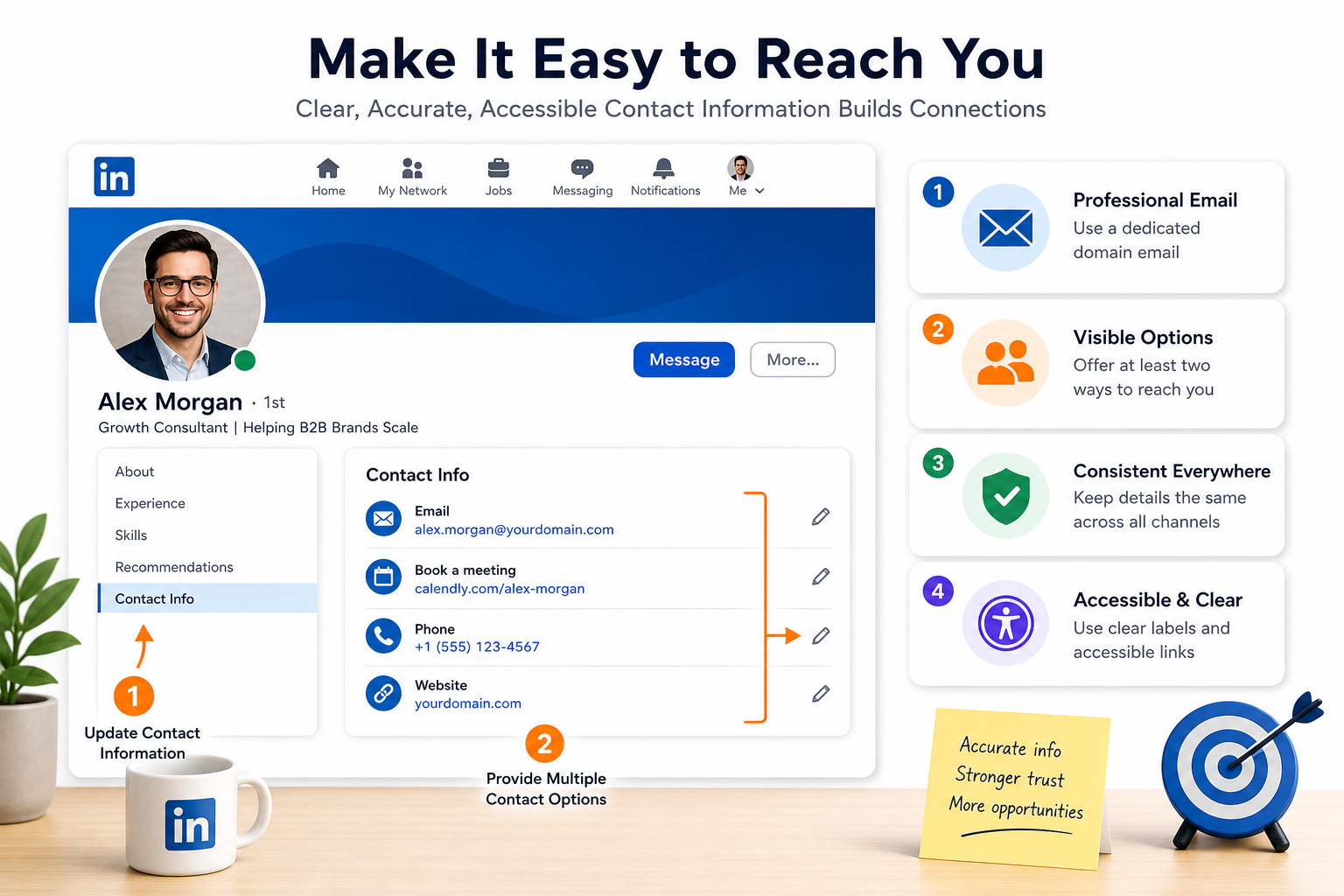
Contact Information is a critical growth tactic because it converts interest into conversations. Keeping your contact details accurate and accessible reduces friction for prospects who want to reach you after engaging with your content. When done well, your contact information becomes a reliable bridge from profile viewing to meaningful outreach, inquiry handling, and opportunity creation.
Key principles to apply across all contact channels:
- Professional email address — use a dedicated professional address that matches your name or brand (for example, first.last@yourdomain.com). Avoid casual addresses that undermine credibility.
- Visible contact options — provide at least two dependable ways to reach you, such as email plus a calendarable meeting link or a business phone number, to accommodate different preferences.
- Consistency across touchpoints — ensure the same contact details appear on your LinkedIn About, Featured content, website, email signature, and proposals to reinforce recognition and trust.
- Accessibility and clarity — present contact methods with clear labels, accessible link text, and keyboard navigability so everyone can reach you easily.
Practical steps to update and optimize contact details within LinkedIn and related assets:
- Audit current contact information — review the Contact Information section, About text, and Featured resources to confirm accuracy and completeness.
- Standardize email addresses — use a professional domain when possible and ensure the address is monitored regularly. If you must use a secondary address for specific purposes, clearly label it (for example, support@yourdomain.com for inquiries or hello@yourdomain.com for partnerships).
- Add alternative contact options — include a calendar link (e.g., scheduling tool), a business phone number if appropriate, and a professional messaging channel (such as LinkedIn messages) with a clear expectation of response time.
- Make contact options accessible — use descriptive link text such as “Email me,” “Schedule a 20-minute strategy session,” or “Message on LinkedIn”, and ensure links are keyboard accessible with visible focus styles.
- Verify privacy and deliverability — test that emails land in inboxes, not spam, by setting up DKIM/SPF records if you own a domain and using recognizable sender names.
- Document response expectations — communicate typical response times (for example, “I respond within 1 business day”) to set clear expectations and reduce follow-up friction.
Accessibility-focused presentation of contact options helps you reach a broader audience and improve conversion rates. The following table outlines recommended contact methods, how to present them, and the rationale behind each choice.
| Contact Method | Presentation Tips | Why It Matters |
|---|---|---|
| Use a professional address; display as a clickable mailto link with a prefilled subject when possible | Direct, traceable communication; supports documentable outreach | |
| Calendar / Scheduling | Link labeled as “Book time” with simple availability windows | Reduces back-and-forth and speeds up conversations |
| Phone (optional) | Provide only if appropriate for your audience; format with international dialing code | Immediate contact path for some buyers; consider regional expectations |
| LinkedIn Messaging | Encourage replies via LinkedIn with a gentle CTA in posts and About | Fits platform norms and preserves inbox hygiene |
| Website contact form | Link to a dedicated contact page or form; ensure form is accessible and labeled | Consolidates inquiries and enables tracking |
Recommended copy patterns for accessibility and clarity:
- Clear CTAs — “Email me at name@domain.com to start a conversation”, or “Schedule a 20 minute call here”.
- Descriptive link text — replace vague phrases like “Click here” with meaningful labels that indicate the action, such as “Email me” or “Book a strategy session”.
- Inline contact cues — place contact options near related content (About section, relevant posts) so readers know how to reach you after consuming information.
Implementation sanity checks you can run this quarter:
- Link verification — ensure every contact link opens in a new tab and uses a descriptive title attribute for screen readers.
- Response time tracking — monitor how quickly you respond to inquiries and adjust guidelines if needed.
- Consistency audit — cross-check all touchpoints (LinkedIn About, Featured, signature blocks, and website) for the same contact details.
- Accessibility testing — confirm color contrast, keyboard navigation, and screen reader compatibility for all contact elements.
By aligning contact information with user expectations and accessibility best practices, you reduce friction and empower prospects to initiate conversations confidently. When contact details are current, professional, and easy to navigate, your profile transitions from passive visibility to tangible engagement and pipeline generation.
About Section
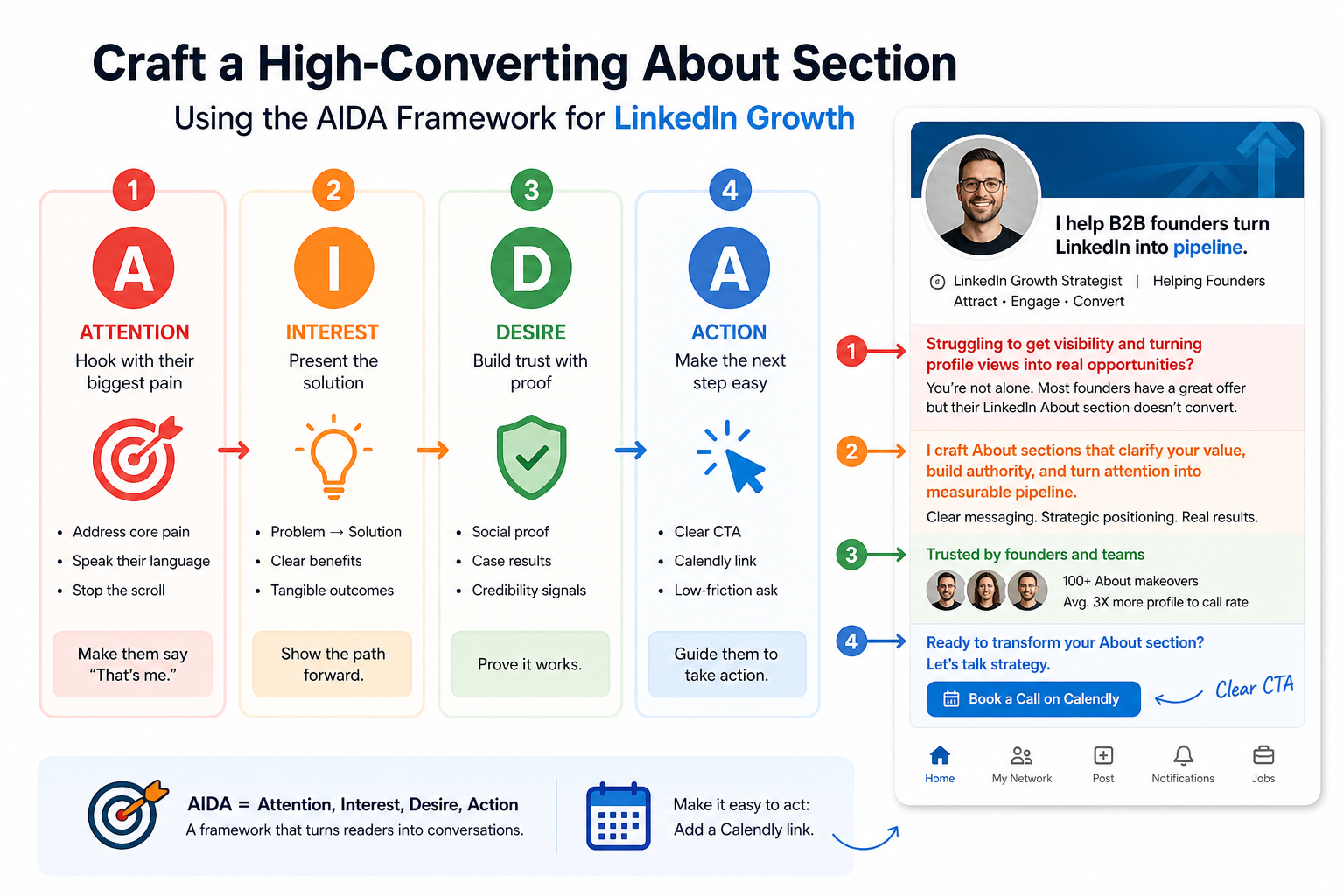
About Section built with the AIDA framework hooks your reader, builds interest, showcases proof, and drives action. This section helps you turn a generic description into a narrative that resonates with your target audience and moves them toward the next step in your growth funnel.
-
Hook (Attention)
Begin with a crisp, pain-centered statement that mirrors the core challenge your ICP faces. The goal is to stop the scroll and make the reader say, “That sounds like me.”
- Pain points to address — time wasted, missed opportunities, limited visibility, or slow conversion cycles.
- Framing — speak in the reader’s terms, not internal jargon or generic promises.
- Voice — bold, confident, and human. A touch of personality helps you stand out without sacrificing professionalism.
Example hook patterns you can adapt:
- Are you leaving pipeline opportunities on the table because your LinkedIn profile sounds generic?
- Struggling to convert profile visits into booked strategy calls or demos?
- What if your About section could turn attention into a measurable next step in minutes?
-
Interest (Dip into the Solution)
Explain briefly how your approach resolves the identified pain, emphasizing clarity over hype. Translate benefits into tangible outcomes your ICP cares about.
- Problem to solution — articulate the core problem and the specific way you address it.
- Value proposition — describe the primary benefit in one or two sentences.
- Audience focus — name the target ICPs and the scenarios where your approach shines.
Suggested structure for the Interest segment:
Element What to Include Problem statement Identify the top friction point your ICP experiences Approach overview One sentence that explains how you address the pain Expected outcome Concrete result, e.g., increase in qualified meetings, faster cycle times -
Desire (Proof and Credibility)
Build trust by offering evidence that your approach works. Include data points, client anecdotes, or credible micro-studies that substantiate your promises.
- Social proof — client outcomes, quantified results, or recognized approvals.
- Context — explain limitations or conditions under which results were achieved to keep expectations realistic.
- Visual cues — consider adding a brief testimonial quote, a short case highlight, or a small data snippet within the About text.
Proof ideas to embed naturally in the About section:
- “In the last quarter we helped [ICP] achieve [X]% faster onboarding and [Y]% more qualified demos.”
- “We’ve supported teams in [industries] to reduce time to first value from weeks to days.”
- A concise stat block or a mini case note can be placed after the hook to reinforce credibility.
-
Action (Clear CTA and Next Steps)
Close with a specific next step that aligns with reader intent. Use a Calendly link or a direct contact option, and set expectations for response time.
- Primary CTA — a Calendly or scheduling link for a focused, low-commitment next step.
- Secondary options — email reply or a LinkedIn message to accommodate different preferences.
- Response expectation — briefly state when you will respond, for example, “I respond within 1 business day.”
Calendly CTA placement suggestions:
- Place the Calendly link early in the section to capture action while curiosity is high.
- Include a text link and a button-styled anchor for accessibility and visibility.
- Provide a calendar-friendly time range to reduce back-and-forth.
Example CTA snippet:
Schedule a 20 minute strategy session to explore how we can turn your LinkedIn presence into a steady pipeline. I typically reply within 1 business day.
Practical tips to optimize the About section for readability and impact:
- Structure and flow — use short paragraphs, bullet points, and bold emphasis to guide scanning readers.
- Keyword alignment — weave target keywords naturally where they fit the narrative, supporting both LinkedIn and external search visibility.
- Tone consistency — match your headline and banner voice to the About section for a cohesive narrative.
- Link discipline — include the Calendly CTA but avoid overloading with too many external links within the About text.
Sample About section skeleton you can adapt:
- Hook — a bold statement about overcoming a core challenge
- Problem and audience — who you help and why it matters
- Approach and value — the method and the primary outcome
- Proof — a compact result mention or client perspective
- CTA — Calendly link with a clear next step and a stated response time
In sum, an effective About section uses the AIDA framework to turn passive profile visitors into engaged readers who see themselves in your narrative, believe in your ability to help, and take a concrete next step via a Calendly or alternative contact method.