You've probably done this already. You found a recruiter on LinkedIn, sent a polite note, maybe even mentioned the role, and then heard nothing back. No reply. No profile view. No sign your message even mattered.
That's the frustrating part of learning how to contact recruiters on LinkedIn. Most advice tells you to “just reach out,” as if the message itself is the whole game. It isn't. Recruiters judge your profile before they judge your note, many won't accept cold requests from strangers, and busy talent teams scan fast on mobile. If your outreach feels generic or arrives cold, it usually dies cold.
The better play is part profile, part targeting, part concise messaging, and, for tougher contacts, part visibility. The candidates who get traction don't just message well. They make it easy for recruiters to understand who they are, what role they want, and why they're worth a response.
Table of Contents
- Prepare Your Profile for Recruiter Outreach
- Find the Right Recruiters for Your Target Roles
- Craft Messages That Actually Get a Response
- Master the Follow-Up Without Being Annoying
- Use the Engagement-First Strategy for Tough Contacts
- Automate Your Visibility Responsibly
Prepare Your Profile for Recruiter Outreach
You send a solid message. The recruiter clicks your profile. Ten seconds later, they move on.
That drop-off usually has little to do with your note. It happens because your profile does not confirm fit fast enough. Recruiters scan for role match, relevant keywords, and proof that you can do the job you want next. If those signals are buried, vague, or inconsistent, outreach stalls before a conversation starts.
Your profile also does more than support direct outreach. It helps recruiters find you in search, and it gives them something credible to assess after they see your name in comments or post interactions. That matters if you are using an engagement-first approach. A thoughtful comment can get you on a recruiter's radar before you ever send a message, but the profile has to hold up once they click.
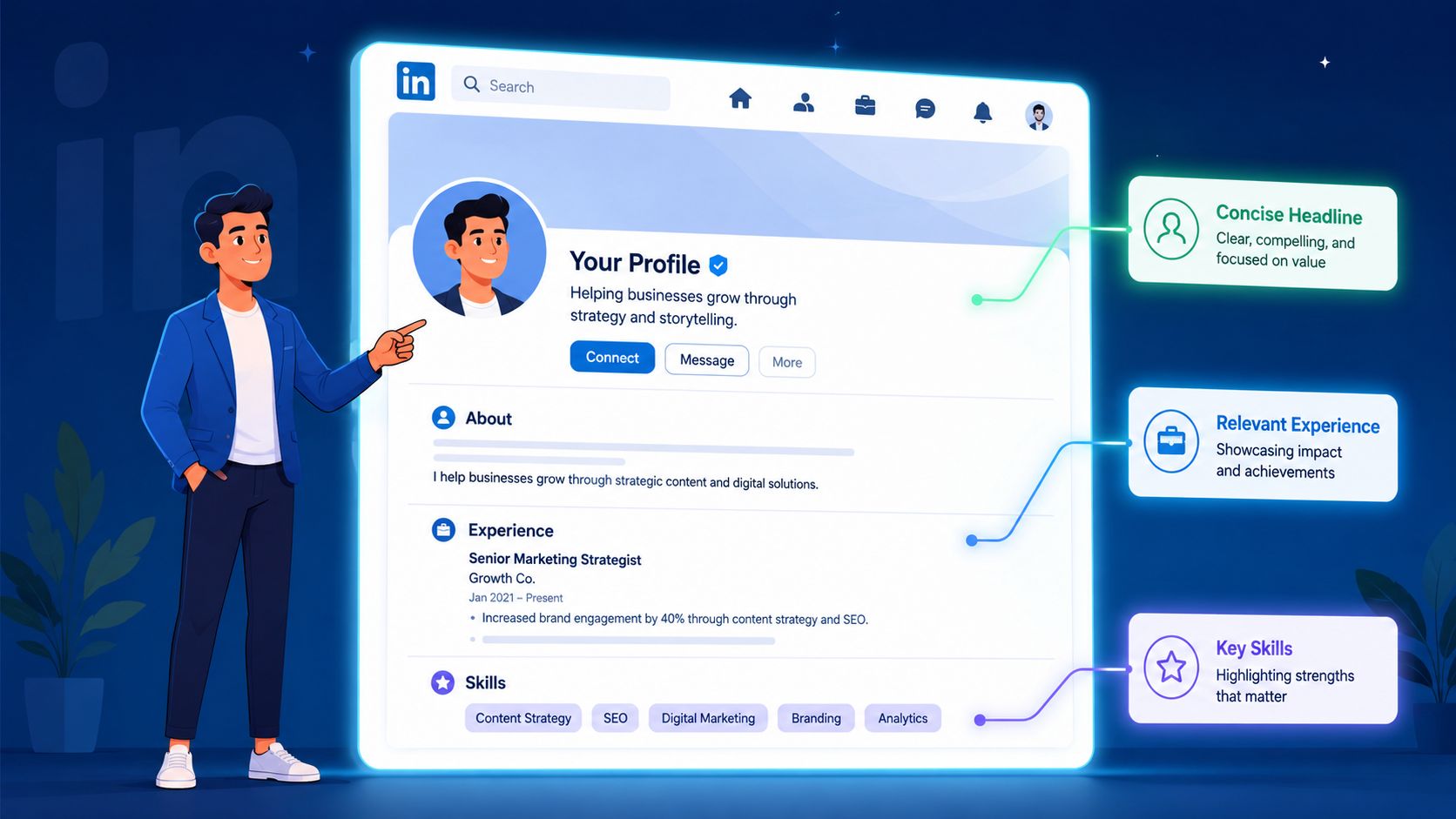
Treat your profile like a landing page
Your profile works like a decision page. Recruiters are not reading it carefully on the first pass. They are checking whether you fit enough to justify a reply, a connection, or a deeper review.
Within a few seconds, they should be able to answer three questions:
- Who are you? Your target function and level should be obvious.
- What are you strong at? Your core skills should appear in clear language.
- What are you aiming for? Your direction should line up with the roles you want.
This is why vague headlines fail. “Experienced professional” gives a recruiter nothing to work with. “Operations Manager improving fulfillment workflows across multi-site teams” gives them scope, domain, and value in one line.
Here is the practical test I use with clients. If someone lands on your profile from a comment you left on a recruiter's post, can they tell your target role from your headline and top section alone? If not, fix that first.
If you want a stronger walkthrough of profile positioning, this LinkedIn profile optimization guide covers the parts recruiters tend to judge fastest.
Fix the three profile elements recruiters check first
Start with your headline. Listing only your current title wastes valuable space, especially if your title is internal, generic, or unrelated to the role you want next. A stronger headline combines function, niche, and business value. For example, “FP&A Analyst | SaaS forecasting, budgeting, board reporting” is clearer and more searchable than “Financial Analyst.”
Next is your About section. Busy recruiters do not need a career autobiography. They need a concise positioning statement that tells them where you fit. A good structure is simple:
- Opening: Your professional identity and level.
- Middle: The problems you solve, tools you use, or environments you know.
- Close: The kinds of roles, teams, or conversations you are open to.
Keep it specific. “Marketing leader with cross-functional experience” is weak. “Product marketer focused on SaaS launches, sales enablement, and customer messaging for B2B teams” gives someone a reason to keep reading.
Then check skills and experience alignment. Many profiles break down at this stage. Candidates say they want product marketing roles, but their profile still reads like communications, content, or general marketing. Recruiters search using title patterns, tools, and domain language, so your target keywords should show up naturally across your headline, About section, experience bullets, and skills list. Use the language employers use in job descriptions, but keep it honest. Stuffing your profile with terms you cannot defend will hurt you in a screening call.
LinkedIn's guidance on recruiter outreach also points people to profile readiness signals such as visibility settings and completeness. If you are actively looking, use Open to Work in the way that fits your situation, either visible to recruiters only or more broadly if privacy is not a concern. Keep the profile active too. A few thoughtful comments on recruiter posts or industry updates can make your profile look current, credible, and easier to recognize when your message arrives later.
Find the Right Recruiters for Your Target Roles
The fastest way to waste a week on LinkedIn is messaging the wrong people. Plenty of candidates do exactly that. They search “recruiter,” fire off notes, and hope someone forwards them internally.
That rarely works well. You need a short list of people tied to your function, geography, and target companies.
Use search like you mean it
LinkedIn search gets better when you stop using it loosely. Search by title patterns, function, and company together.
Try combinations like these in LinkedIn search:
- "recruiter" AND "data analyst"
- "talent acquisition" AND "product manager" AND "Stripe"
- "technical recruiter" AND "backend" AND "New York"
- "talent partner" AND "customer success"
You're not trying to find every recruiter. You're trying to find the recruiter most likely to care about your background.
Refine from there using filters:
- People filter: Narrow to individual profiles.
- Current company: Focus on your target employer.
- Location: Match the market you're applying in.
- Connections or shared network: Helpful when available.
- Recent activity: Prioritize people who actively use LinkedIn.
Use company pages and job posts to find the real gatekeepers
Company pages often reveal better contacts than generic search.
Open the company page, go to People, and search inside that employer for terms like recruiter, talent acquisition, talent partner, sourcer, or hiring manager. This is especially useful at larger companies where the recruiter for your role may not use “recruiter” as the primary title.
Job posts are another shortcut. If a role has a visible recruiter attached, that's usually your first stop. Even if no recruiter is listed, the posting gives you exact language to mirror in your profile and message.
A simple workflow works well:
- Save the target role
- Identify the company recruiter or talent partner
- Look for the hiring manager or department lead
- Note any shared connections, recent posts, or hiring updates
Recruiters expect specificity. If you reference an exact role, job ID, team, or recent hiring push, your outreach immediately sounds more credible than a generic “I'd love to connect.”
Know who you are contacting
Not every recruiter plays the same role.
| Contact type | What they usually handle | Best approach |
|---|---|---|
| Internal recruiter | Hiring for one employer | Mention the exact role or team |
| Talent partner | Broader hiring coordination | Show fit and ask a focused question |
| Agency recruiter | Multiple clients and openings | Be clear about your niche and constraints |
| Hiring manager | Team needs, not recruiting ops | Keep it brief and relevance-heavy |
Internal recruiters usually care most about fit for a specific opening. Agency recruiters often work across several openings, so they need a cleaner snapshot of your experience, location, and constraints. Hiring managers can be useful when no recruiter responds, but they're rarely the first person to pitch broadly.
A targeted contact list beats volume. A smaller list of relevant recruiters with visible alignment will outperform a scattered batch of messages every time.
Craft Messages That Actually Get a Response
You find the right recruiter, send a polished note, and hear nothing. In many cases, the problem is not your background. It is the message. Recruiters scan fast, usually on mobile, and they make a judgment in seconds.
Brevity matters. ConnectSafely recommends keeping first direct messages in the 80 to 150 word range in its recruiter outreach guidance. Teal notes that LinkedIn connection requests require you to click Add a Note, and that note is capped at 300 characters in its guide on connecting with recruiters on LinkedIn.
The trade-off is simple. Short messages get read. Messages that are too short sound lazy. The goal is a concise note with enough context for the recruiter to know why you are reaching out and what to do next.
Pick the right outreach channel
Use the channel that matches the moment.
| Channel | Best For | Key Constraint | Pro Tip |
|---|---|---|---|
| Connection Request Note | First touch with a recruiter you don't know | 300-character limit | Mention a role, team, or piece of shared context |
| Direct Message | After they accept your request | Must be easy to read on mobile | Ask one focused question |
| InMail | Reaching someone outside your network for a high-priority role | Higher relevance bar | Explain why you chose them, not just the company |
If you want examples of how these formats differ, this LinkedIn DM outreach strategy guide covers message structure in more detail.
One practical note. A connection request is not the place for your full pitch. Its job is to earn the next step.
Write for reply, not self-expression
A strong recruiter message does three things fast:
- States who you are
- Shows match with a specific role or hiring need
- Ends with a low-friction ask
That structure holds up because it respects how recruiters work. They are triaging openings, candidate flow, and hiring manager requests. If your note forces them to guess where you fit, they move on.
HeroHunt recommends leading with a hook, explaining why you are relevant, and ending with an easy ask in its LinkedIn outreach guide. Coursera also advises keeping recruiter outreach short and using the limited connection note space carefully in its LinkedIn recruiter messaging article.
Here is a connection note that works:
Strong connection note
Hi Maya, I applied for the Senior Customer Success Manager role and saw you support hiring for the team. I've led enterprise renewals in B2B SaaS and would value connecting.
Why it works:
- It names the exact role.
- It gives a quick proof point.
- It asks for connection, not a favor.
Here is one that usually gets ignored:
Weak connection note
Hi, I'm exploring new opportunities and would love to connect. Please let me know if your company is hiring for anything that fits my background.
Why it fails:
- It is broad.
- It gives the recruiter homework.
- It says nothing useful about fit.
Use specificity, then make the ask easy
Generic outreach gets skipped because it creates friction. Forbes advises candidates to reference the exact job and avoid vague messages in its article on messaging recruiters on LinkedIn.
A better first message after connecting looks like this:
Hi Daniel, thanks for connecting. I'm a supply chain analyst focused on inventory planning and vendor coordination in retail. I applied for the Planner role last week and wanted to introduce myself directly. If helpful, I can send a resume specific to planning roles or answer any questions about my background.
That message works because it gives Daniel enough to place the candidate quickly. It also keeps the ask light.
In practice, low-friction asks get more replies than big asks. Good examples include:
- Would it help if I sent a resume for this role?
- Is this role still active?
- Should I contact someone else on the team for this opening?
Bad asks include:
- Can you get me an interview?
- Can you review my whole background?
- Are there any jobs for me?
Warm the conversation before you message
Many job seekers often miss an advantage. If a recruiter is hard to reach, do not make your first touch a cold ask. Comment on a recent hiring post, team update, or industry post first. A thoughtful comment can put your name in front of them without asking for anything.
For example, if a recruiter posts about hiring customer success managers, a useful comment might be:
Strong point on onboarding complexity. In my last SaaS role, we cut time-to-value by rebuilding the handoff from sales to CS. Following this team's growth with interest.
Now your later message lands warmer:
Hi Maya, I commented on your post about CS hiring this week. I also applied for the Senior CSM role. My background is in enterprise renewals and onboarding strategy, so I wanted to introduce myself directly.
That sequence works well because the recruiter has already seen your name in a professional context. It is a better approach than sending a cold request into a crowded inbox.
Keep these rules in mind
- Don't paste a mini cover letter into LinkedIn.
- Don't ask for a job before you establish fit.
- Don't send the same script to five recruiters at one company.
- Don't use spammy phrasing, excessive punctuation, or a stack of questions.
One screen is enough. If your message needs scrolling, cut it in half.
Master the Follow-Up Without Being Annoying
You sent a solid message. Then nothing for four days. By day five, many job seekers make the same mistake. They send a nudge that says nothing, ask if the recruiter saw it, or pile on a second request.
Silence usually means one of three things. The recruiter is buried, the role shifted, or your note was seen and postponed. A good follow-up respects that reality. It keeps you visible without sounding needy.
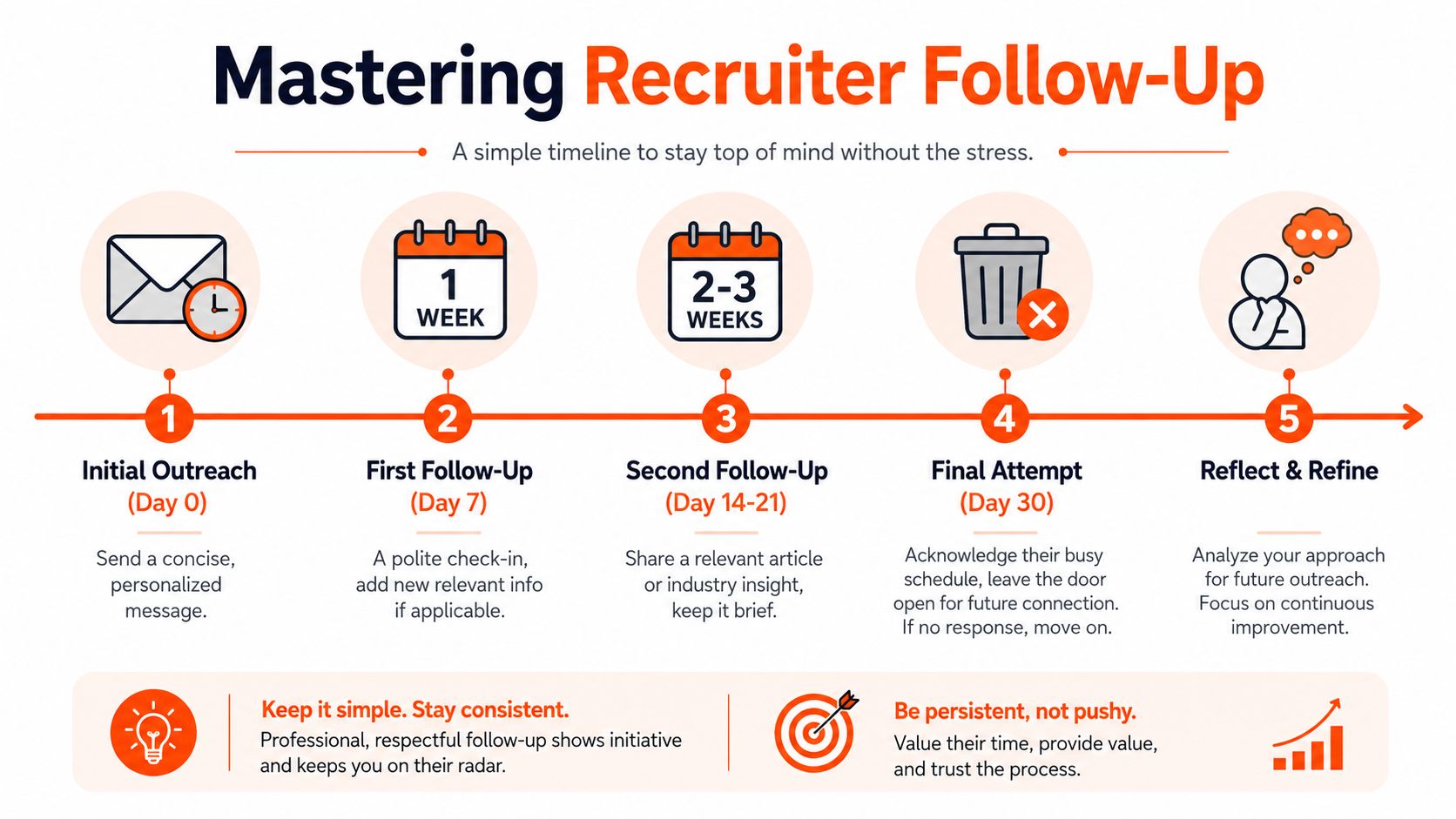
Use a simple follow-up rhythm
Keep the cadence tight and predictable.
- Day 0: Send your original message and record it.
- Day 4 or 5: Send one short follow-up.
- About a week later: Send a final follow-up if the role is still open and you still fit it well.
- Then stop: Two follow-ups are enough.
That limit matters. Recruiters remember candidates who are clear and professional. They also remember candidates who keep pushing after no reply. One extra message rarely changes the outcome. It often changes the impression.
If you want a stronger system for warming up hard-to-reach contacts between touches, use this LinkedIn engagement-first outreach guide. A thoughtful comment on a recruiter's post can do more than a third inbox nudge.
Write follow-ups that move the conversation forward
A follow-up needs a reason to exist. New context works. Relevance works. Empty nudges do not.
Weak follow-up:
Just checking in on this.
Stronger follow-up:
Hi Elena, following up on the Data Operations role. I saw the team is building out analytics workflows, and that lines up with my recent work improving dashboard QA and reporting accuracy. If useful, I can send a version of my resume tailored to data quality work.
That message works because it reconnects your experience to the job. It also gives the recruiter an easy next step.
Another example, if you applied after speaking with someone on the team:
Hi Marcus, following up on the Product Analyst role. After applying, I spoke with one of your team members about the company's experimentation work. My background in SQL analysis and A/B test reporting seems closely aligned, so I wanted to reintroduce myself here.
Short. Specific. Easy to scan.
Track your outreach so you do not create your own confusion
Job searches get messy fast. After a few dozen applications, people forget who they contacted, when they followed up, and which version of their story they told.
Keep a simple tracker with:
- Recruiter name
- Company
- Role
- Date applied
- Date of first message
- Follow-up dates
- Outcome
I recommend this to clients because it prevents two common errors. Sending duplicate follow-ups to the same recruiter. Letting good opportunities die because you forgot to reappear at the right time.
One rule to keep: follow up with relevance, then move on with your momentum intact.
Use the Engagement-First Strategy for Tough Contacts
The standard advice is connect first, then pitch. That works sometimes. It fails a lot with senior recruiters, hiring managers, and anyone who gets flooded with inbound requests.
Most guides stop too early here. They assume access is available if your note is good enough. It often isn't.
Data shows that 40% of LinkedIn users do not accept connection requests from strangers without prior engagement, and the most effective yet underserved tactic is the engagement-first approach, which uses comments on a recruiter's posts to build familiarity before sending a message, as covered in this discussion of recruiter outreach strategy.
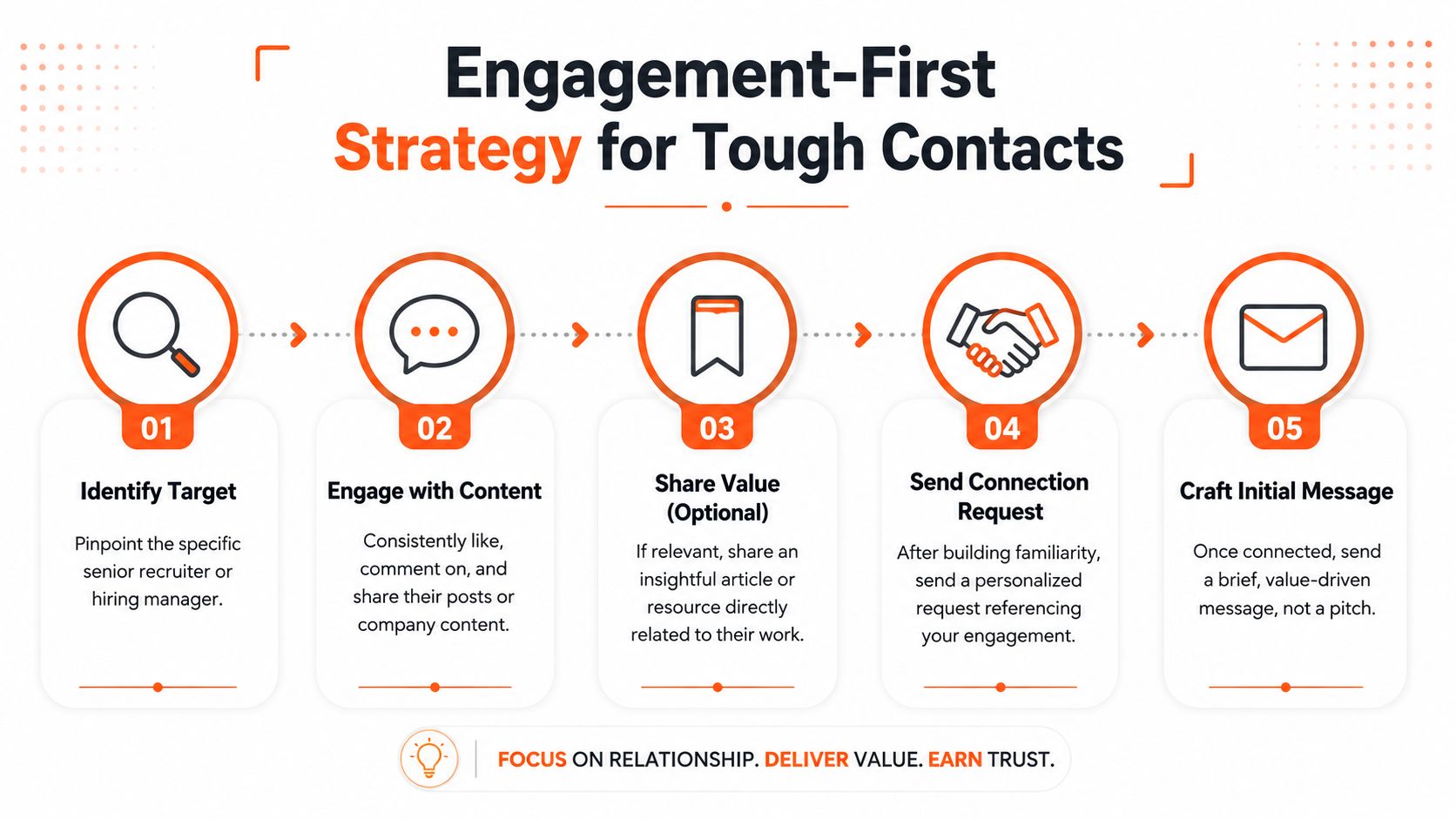
Why cold outreach fails with senior recruiters
Senior recruiters and talent leaders often protect their inboxes. They don't know you, they don't owe you context, and a cold request that immediately asks for help can feel transactional.
Engagement changes the dynamic. If they've seen your name under their post a few times, especially attached to thoughtful comments, your connection request no longer arrives as pure cold outreach.
That's the key difference. You're not trying to trick the algorithm. You're creating familiarity before the ask.
If you want a deeper breakdown of this approach, this LinkedIn engagement strategy guide is useful.
How to warm up a recruiter before you message them
This works best when it's specific and restrained.
Start by identifying recruiters or hiring managers who post at least occasionally. Then engage with content that's relevant to your target role, their company, or the hiring market they work in.
Useful comments usually do one of three things:
- Add a practical observation: Briefly build on their point.
- Ask a smart question: Not for attention. For real conversation.
- Connect the post to live work: Mention a related challenge or pattern you've seen.
Examples:
- Good comment: Strong point on onboarding ramp time. I've seen the same issue when teams hire quickly without tightening documentation first.
- Good comment: This matches what I've noticed in customer success hiring lately. Teams want more commercial ownership, not just retention support.
- Weak comment: Great post!
- Weak comment: Interested.
- Weak comment: Please check my profile.
After a few relevant touches, send a connection request that references the interaction naturally.
Example:
Hi Priya, I've appreciated your recent posts on go-to-market hiring, especially your point about role clarity early in the process. I'd love to connect as I explore product marketing opportunities.
This is why engagement-first is so effective for tough contacts. It bypasses the stranger problem without turning you into a spammer.
Automate Your Visibility Responsibly
The hard part about the engagement-first method isn't whether it works. It's whether you can keep doing it while applying, interviewing, and holding down the rest of your life.
That's where responsible automation helps. Not message blasting. Not fake networking. Just consistent visibility built through relevant comments and posts that keep your profile active in the right circles.
What to automate and what not to automate
The right things to automate are the repetitive parts of showing up. Finding relevant conversations. Drafting thoughtful comments in your voice. Keeping a steady rhythm so recruiters and hiring managers see your name before you ever ask for their time.
The wrong things to automate are the trust-sensitive parts. Don't auto-send canned pitches to recruiters. Don't outsource judgment. Don't let software turn you into the person leaving robotic comments everywhere.
Used well, an AI agent can support the strategy this article has argued for from the start. It can help you stay present, visible, and consistent enough to warm up cold contacts at scale without flooding anyone's inbox.
A short product walkthrough helps if you want to see that workflow in action.
That's the practical upside. You spend less time hunting for posts to engage with and more time sending outreach when there's already some familiarity in place. Done carefully, you can grow LinkedIn while you sleep and keep your job search visible even on days when you're busy elsewhere.
If you want to automate the visibility side of recruiter outreach without turning your LinkedIn presence into spam, take a look at Linqin. It helps you stay active with relevant comments and posts so more recruiters see your name before you contact them. If you're ready to grow LinkedIn while you sleep, you can sign up for Linqin.